Preferences
Understanding Ampache Preferences
One thing that isn't very easy to understand are all the extra options, preferences and ways of setting things up on your server.
This page explains how preferences work, where each one lives, who is allowed to change it, and lists every preference Ampache ships with.
There are 3 major types of preference:
- System Preferences - the server-wide defaults, edited by an admin
- User Preferences - each user's own copy of those values
- Config Preferences - settings in
config/ampache.cfg.phpthat are not editable from the web interface
How a preference is stored
Every preference exists twice in the database and understanding that is the key to everything else on this page.
- The
preferencetable holds one row per preference: its name, description, access level, type, category and subcategory. There is exactly one row per preference for the whole server. - The
user_preferencetable holds the value, one row per user per preference.
The special user id -1 is the system user. Its user_preference rows are the server defaults, and that is what you are editing on the Server Config pages.
From there the value a user gets is decided in one of two ways:
- Preferences in the System category always read the value from user
-1. A user's own row is ignored, which is why those settings are the same for everybody and why the System page has no Apply to All column. - Every other preference reads the user's own row. When a user has no row yet — a new account, or a preference added by an upgrade — the value is copied from user
-1at that moment and then belongs to the user.
That copy happens once. Changing a server default later does not reach users who already have a value; use Apply to All for that.
Finding preferences in the interface
Your own preferences are under the Preferences tab in the sidebar.
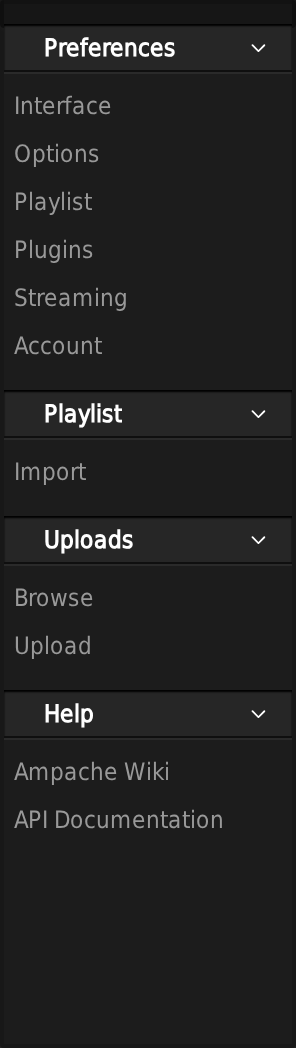
Server preferences are under the Admin tab, in the Server Config section. Note the extra System entry that does not appear on the user list.

Both lists are built from the preference categories, so a plugin that adds preferences appears under Plugins automatically.
User Preferences
A user editing their own preferences sees two columns: the preference and its value.
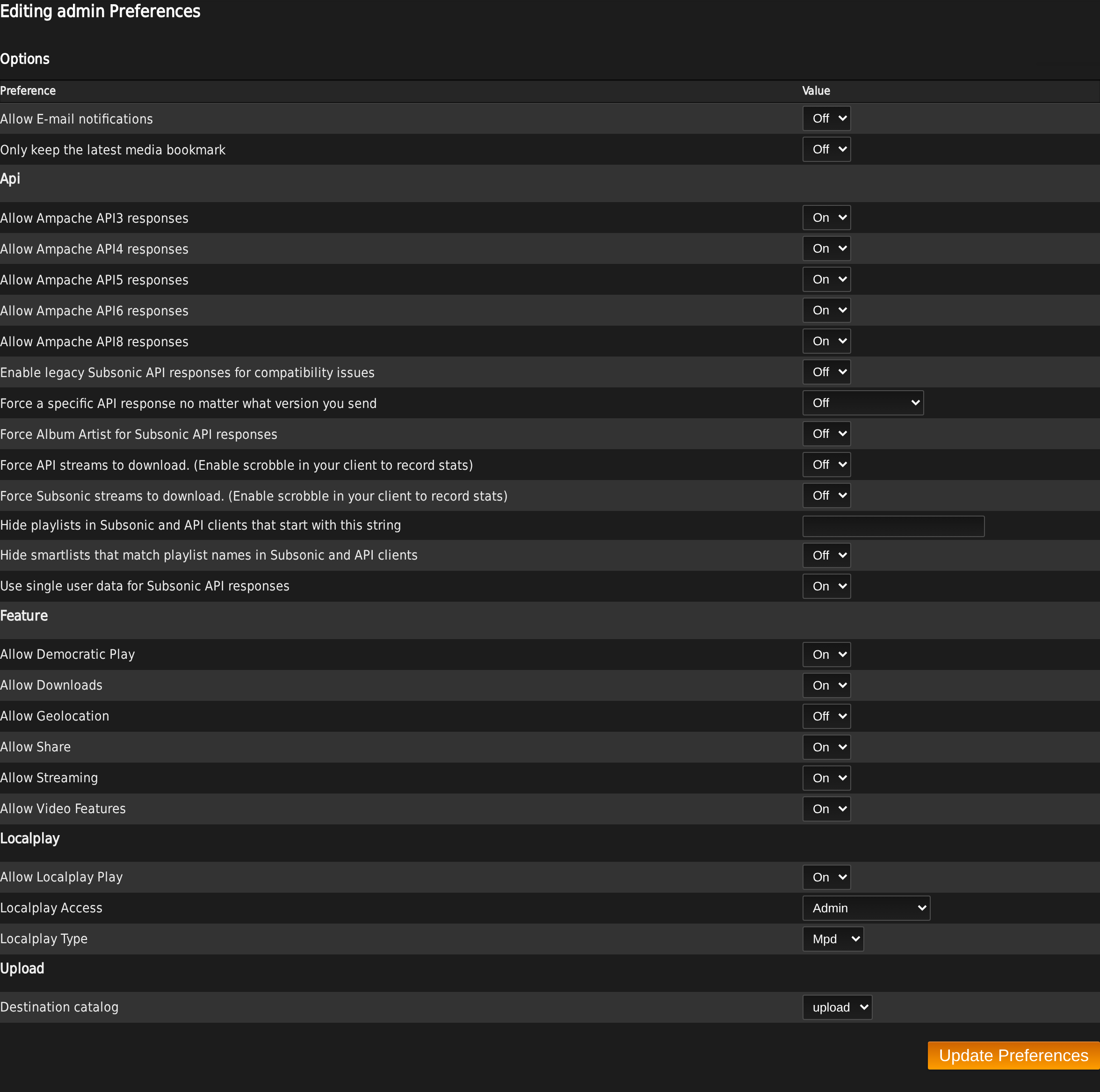
A user only gets an input for a preference whose access level they meet. Anything above their level is still shown, but as read-only text — Enabled/Disabled for a boolean, ****** for a password or api key, and the plain value for everything else.
Admins can edit another user's preferences from Admin -> Browse Users -> Preferences, which is the same page pointed at a different user id.
System Preferences
System preferences are the defaults for the server and for CLI actions, and they are copied to a new user when the account is created (excluding the System and Plugins categories, which are never copied).
When an admin edits them through Server Config, two extra columns appear.
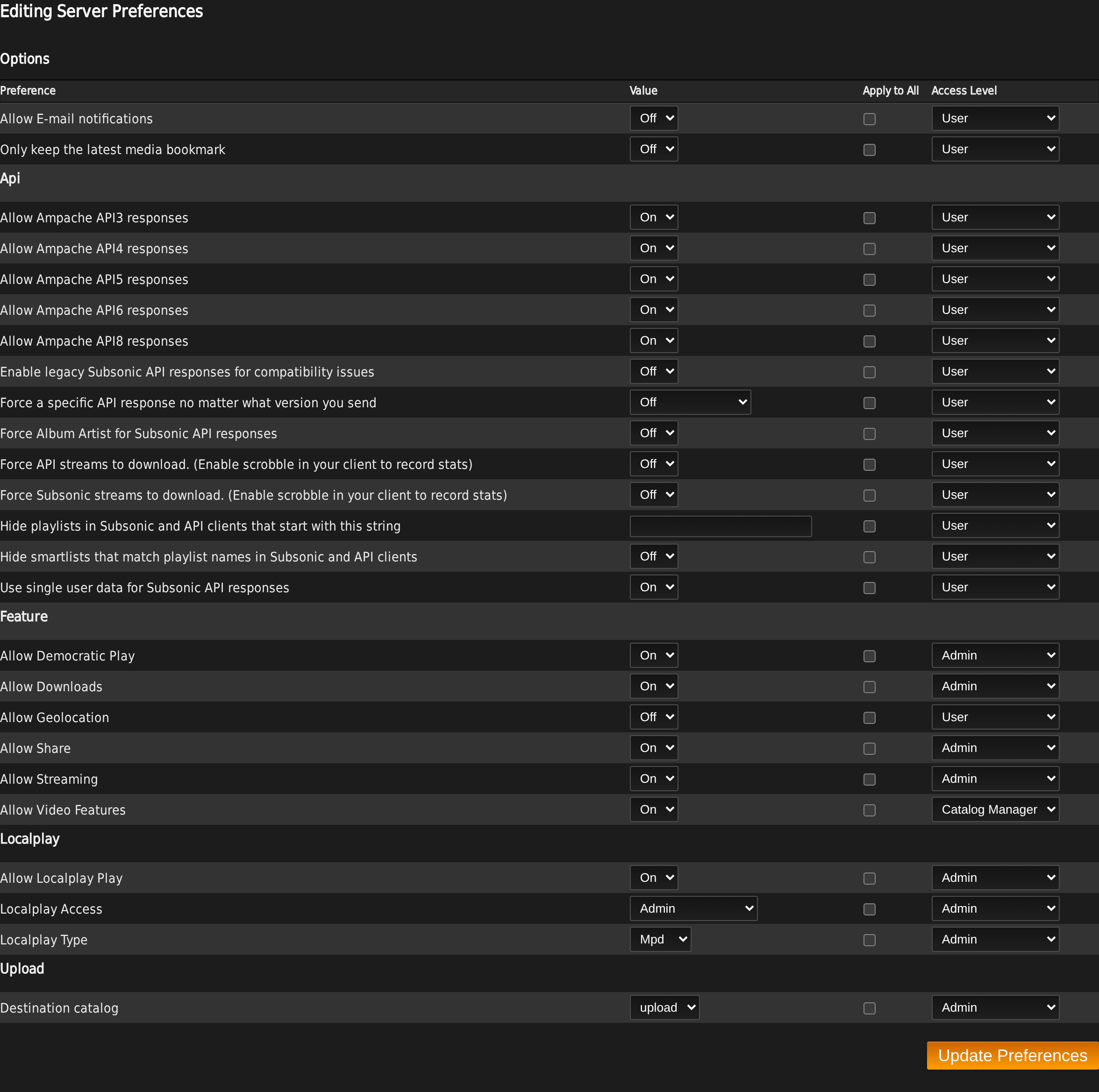
- Apply to All - tick the box and the value you are saving is written to every existing user, overwriting whatever they had. Use this to reset a preference across your server.
- Access Level - the minimum user level allowed to change this preference. A user below it sees the value but cannot edit it.
Neither column appears on the System page, because those preferences have no per-user value to apply or restrict.
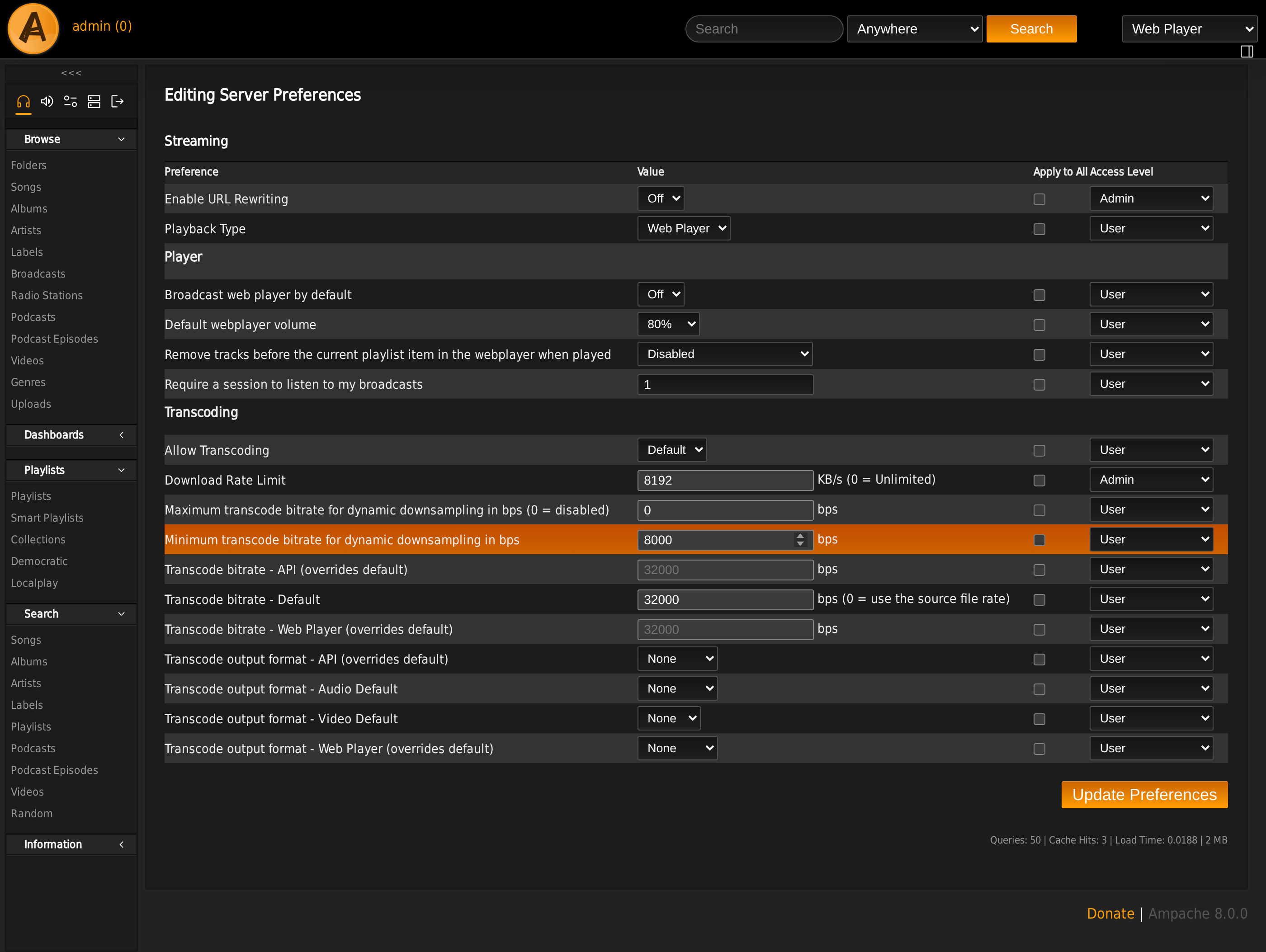
The Streaming page is a good example of a category that is mostly per-user with an admin-only pair at the top.
Config Preferences
Config preferences are set in the config file in the Ampache install folder, config/ampache.cfg.php.
They cover the things that must not be editable from a browser: database credentials, file and folder locations, transcoding commands, auth methods, caching and logging. They apply to the whole server and there is no per-user copy.
See Basic Configuration for the config file itself, and Config changes for what Ampache8 added, removed and changed.
A few settings exist in both places and the database preference wins. encode_target, encode_video_target, encode_player_webplayer_target, encode_player_api_target, max_bit_rate and min_bit_rate used to be config-only; in Ampache8 they are per-user preferences and the config values are read once on upgrade to seed the default.
Access levels
There are five access levels. They are the same levels used for user accounts, so "this preference needs User" means an account at User or above may change it.
| Level | Value | Meaning |
|---|---|---|
| Guest | 5 | Read only access, generally an unregistered or restricted account |
| User | 25 | A standard user; can change their own settings and stream |
| Content Manager | 50 | Some additional settings not open to normal users |
| Catalog Manager | 75 | Everything except user management |
| Admin | 100 | Everything |
A preference listed below as Default (0) has no restriction at all and can be changed by anyone, including a guest.
You can reset every preference's access level in one move from the CLI:
php bin/cli admin:updatePreferenceAccessLevel --level admin -e
The accepted levels are guest, user, content_manager, manager and admin, each of which sets every preference to that level, plus default, which restores the per-preference levels listed in the tables below. Like admin:resetPreferences it is a dry run without -e.
Setting everything to admin is the usual way to lock down a shared or public server; default is how you undo it.
Presets
Rather than setting a user's preferences one at a time, you can apply a whole preset:
php bin/cli admin:resetPreferences some-user --preset default -e
Like most CLI commands this is a dry run without -e.
| Preset | What it does |
|---|---|
system | Copies whatever the server currently has (user -1) onto that user |
default | Ampache's shipped defaults |
minimalist | The defaults with download, browse_filter and show_wrapped turned off |
community | The minimalist set with share turned on and the home page panels (home_now_playing, home_recently_played, home_recently_played_all) turned off |
A preset writes every preference it lists, not only the ones that differ, so applying one is a full reset of that user rather than a patch.
Categories
User and system preferences are split into six categories, which are the pages in the sidebar above:
- Interface
- Options
- Playlist
- Plugins
- Streaming
- System
A seventh category, internal, exists in the database but is deliberately never displayed. It holds values Ampache stores against a user that are not settings at all — the last auto-update check, the Last.FM submit challenge, the active HTTPQ instance.
Within a category, preferences are grouped by subcategory — the sub-headings you see on the page (Browse, Player, Sidebar, Transcoding, ...).
Every preference
Ampache8 ships 172 preferences. The tables below list all of them by category and subcategory, with the value a fresh install starts from and the access level required to change it.
The Type column is what the interface renders: boolean is an On/Off dropdown, integer and string are text inputs, special is a hand-built control (a theme list, a language list, a volume picker), and transcoding is an output-format picker filled from your configured encode_args_<format> keys.
Interface
The largest category — everything about how Ampache looks and what it shows you.
| Preference | Description | Default | Type | Access level |
|---|---|---|---|---|
lang | Language | en_US | special | Admin |
show_donate | Show donate button in footer | 1 | boolean | User |
Interface -> Browse
| Preference | Description | Default | Type | Access level |
|---|---|---|---|---|
browse_filter | Show filter box on browse | 1 | boolean | User |
hide_genres | Hide the Genre column in browse table rows | 0 | boolean | User |
hide_single_artist | Hide the Song Artist column for Albums with one Artist | 0 | boolean | User |
libitem_browse_alpha | Alphabet browsing by default for following library items (album,artist,...) | (empty) | string | Catalog Manager |
show_license | Show License | 1 | boolean | User |
show_original_year | Show Album original year on links (if available) | 1 | boolean | User |
show_played_times | Show # played | 0 | string | User |
show_playlist_username | Show playlist owner username in titles | 1 | boolean | User |
show_skipped_times | Show # skipped | 0 | boolean | User |
show_subtitle | Show Album subtitle on links (if available) | 1 | boolean | User |
use_original_year | Browse by Original Year for albums (falls back to Year) | 0 | boolean | User |
Interface -> Cookies
These record the grid/table choice you make with the view toggle on a browse, so each browse type remembers how you last looked at it.
| Preference | Description | Default | Type | Access level |
|---|---|---|---|---|
browse_album_disk_grid_view | Force Grid View on Album Disk browse | 0 | boolean | User |
browse_album_grid_view | Force Grid View on Album browse | 0 | boolean | User |
browse_artist_grid_view | Force Grid View on Artist browse | 0 | boolean | User |
browse_live_stream_grid_view | Force Grid View on Radio Station browse | 0 | boolean | User |
browse_playlist_grid_view | Force Grid View on Playlist browse | 0 | boolean | User |
browse_podcast_episode_grid_view | Force Grid View on Podcast Episode browse | 0 | boolean | User |
browse_podcast_grid_view | Force Grid View on Podcast browse | 0 | boolean | User |
browse_song_grid_view | Force Grid View on Song browse | 0 | boolean | User |
browse_video_grid_view | Force Grid View on Video browse | 0 | boolean | User |
Interface -> Custom
| Preference | Description | Default | Type | Access level |
|---|---|---|---|---|
custom_blankalbum | Custom blank album default image | (empty) | string | Catalog Manager |
custom_datetime | Custom datetime | (empty) | string | User |
custom_logo | Custom URL - Logo | (empty) | string | User |
custom_logo_user | Custom URL - Use your avatar for header logo | 0 | boolean | User |
custom_timezone | Custom timezone (Override PHP date.timezone) | (empty) | string | User |
site_title | Website Title | Ampache :: For the Love of Music | string | Admin |
custom_datetime takes a PHP date format string; leave it empty for the site default. custom_timezone takes a PHP timezone name such as Australia/Sydney.
Interface -> Home
| Preference | Description | Default | Type | Access level |
|---|---|---|---|---|
home_moment_albums | Show Albums of the Moment | 1 | integer | User |
home_moment_videos | Show Videos of the Moment | 0 | integer | User |
home_now_playing | Show Now Playing | 1 | integer | User |
home_recently_played | Show Recently Played | 1 | integer | User |
home_recently_played_all | Show all media types in Recently Played | 1 | boolean | User |
index_dashboard_form | Use Dashboard links for the index page header | 0 | boolean | User |
now_playing_per_user | Now Playing filtered per user | 1 | boolean | Content Manager |
of_the_moment | Set the amount of items Album/Video of the Moment will display | 6 | integer | User |
Interface -> Library
| Preference | Description | Default | Type | Access level |
|---|---|---|---|---|
album_group | Album - Group multiple disks | 1 | boolean | User |
album_release_type | Album - Group per release type | 1 | boolean | User |
album_release_type_sort | Album - Group per release type sort | album,ep,live,single | string | User |
album_sort | Album - Default sort | default | string | User |
external_links_bandcamp | Show Bandcamp search icon on library items | 1 | boolean | User |
external_links_discogs | Show Discogs search icon on library items | 1 | boolean | User |
external_links_duckduckgo | Show DuckDuckGo search icon on library items | 1 | boolean | User |
external_links_google | Show Google search icon on library items | 1 | boolean | User |
external_links_lastfm | Show Last.fm search icon on library items | 1 | boolean | User |
external_links_musicbrainz | Show MusicBrainz search icon on library items | 1 | boolean | User |
external_links_wikipedia | Show Wikipedia search icon on library items | 1 | boolean | User |
libitem_contextmenu | Library item context menu | 1 | boolean | Default |
Turning album_group off makes the album disk the browsing unit, so you browse and play individual disks instead of the whole album. API8 added album_disk methods so a client can see the same objects.
Interface -> Notification
| Preference | Description | Default | Type | Access level |
|---|---|---|---|---|
browser_notify | Web Player browser notifications | 1 | integer | User |
browser_notify_timeout | Web Player browser notifications timeout (seconds) | 10 | integer | User |
Interface -> Player
| Preference | Description | Default | Type | Access level |
|---|---|---|---|---|
direct_play_limit | Limit direct play to maximum media count | 500 | integer | User |
show_lyrics | Show lyrics | 0 | boolean | Default |
slideshow_time | Artist slideshow inactivity time | 0 | integer | User |
song_page_title | Show current song in Web player page title | 1 | boolean | User |
webplayer_confirmclose | Confirmation when closing current playing window | 0 | boolean | User |
webplayer_pausetabs | Auto-pause between tabs | 1 | boolean | User |
direct_play_limit caps how many items a single play/add action may queue. Ampache8 resets an existing 0 (unlimited) to 500 on upgrade, because an unbounded queue on a large browse is what makes a page hang.
Interface -> Privacy
| Preference | Description | Default | Type | Access level |
|---|---|---|---|---|
allow_personal_info_agent | Share Recently Played information - Allow access to streaming agent | 1 | boolean | User |
allow_personal_info_now | Share Now Playing information | 1 | boolean | User |
allow_personal_info_recent | Share Recently Played information | 1 | boolean | User |
allow_personal_info_time | Share Recently Played information - Allow access to streaming date/time | 1 | boolean | User |
show_wrapped | Enable access to your personal "Spotify Wrapped" from your user page | 1 | boolean | User |
These control what other users can see about you. Turning allow_personal_info_now off hides you from the Now Playing panel entirely; the three recent settings progressively hide the played item, the time it was played and the client that played it.
Interface -> Query
| Preference | Description | Default | Type | Access level |
|---|---|---|---|---|
offset_limit | Offset Limit | 50 | integer | Default |
popular_threshold | Popular Threshold | 10 | integer | User |
stats_threshold | Statistics Day Threshold | 7 | integer | User |
offset_limit is the page size for every browse. popular_threshold is how many rows the Top/Statistics lists show. stats_threshold is how many days of play history those lists consider, so a long-running server still has new albums reaching the top.
Interface -> Sidebar
| Preference | Description | Default | Type | Access level |
|---|---|---|---|---|
show_album_artist | Show 'Album Artists' link in the main sidebar | 1 | boolean | User |
show_artist | Show 'Artists' link in the main sidebar | 0 | boolean | User |
show_collection | Show 'Collections' link in the main sidebar | 1 | boolean | User |
show_folder | Show 'Folders' link in the main sidebar | 1 | boolean | User |
sidebar_hide_browse | Hide the Browse menu in the sidebar | 0 | boolean | User |
sidebar_hide_dashboard | Hide the Dashboard menu in the sidebar | 0 | boolean | User |
sidebar_hide_information | Hide the Information menu in the sidebar | 0 | boolean | User |
sidebar_hide_playlist | Hide the Playlist menu in the sidebar | 0 | boolean | User |
sidebar_hide_search | Hide the Search menu in the sidebar | 0 | boolean | User |
sidebar_hide_switcher | Hide sidebar switcher arrows | 0 | boolean | User |
sidebar_hide_video | Hide the Video menu in the sidebar | 0 | boolean | User |
sidebar_light | Light sidebar by default | 0 | boolean | User |
sidebar_order_browse | Custom CSS Order - Browse | 10 | integer | User |
sidebar_order_dashboard | Custom CSS Order - Dashboard | 15 | integer | User |
sidebar_order_information | Custom CSS Order - Information | 60 | integer | User |
sidebar_order_playlist | Custom CSS Order - Playlist | 30 | integer | User |
sidebar_order_search | Custom CSS Order - Search | 40 | integer | User |
sidebar_order_video | Custom CSS Order - Video | 20 | integer | User |
The sidebar_order_* values are CSS flex order numbers, so a lower number sorts higher. The gaps between the defaults are there so you can slot one menu between two others without renumbering the rest.
The Folders link also needs the folder tables to have been scanned; the Collections link appears as soon as the preference is on.
Interface -> Theme
| Preference | Description | Default | Type | Access level |
|---|---|---|---|---|
mini_player | Lock this user into the mini player interface | 0 | boolean | Admin |
theme_color | Theme color | dark | special | Default |
theme_name | Theme | reborn | special | Default |
topmenu | Top menu | 0 | boolean | User |
ui_fixed | Fix header position on compatible themes | 0 | boolean | User |
theme_name is read from the themes/ directory, so a theme you drop in appears here — see Themes. mini_player is a display lock, not an access control; the user's access level still decides what data they can reach.
Options
Feature switches and API behavior.
| Preference | Description | Default | Type | Access level |
|---|---|---|---|---|
bookmark_latest | Only keep the latest media bookmark | 0 | boolean | User |
notify_email | Allow E-mail notifications | 0 | boolean | User |
Options -> Api
| Preference | Description | Default | Type | Access level |
|---|---|---|---|---|
api_always_download | Force API streams to download. (Enable scrobble in your client to record stats) | 0 | boolean | User |
api_enable_3 | Allow Ampache API3 responses | 1 | boolean | User |
api_enable_4 | Allow Ampache API4 responses | 1 | boolean | User |
api_enable_5 | Allow Ampache API5 responses | 1 | boolean | User |
api_enable_6 | Allow Ampache API6 responses | 1 | boolean | User |
api_enable_8 | Allow Ampache API8 responses | 1 | boolean | User |
api_force_version | Force a specific API response no matter what version you send | 0 | special | User |
api_hidden_playlists | Hide playlists in Subsonic and API clients that start with this string | (empty) | string | User |
api_hide_dupe_searches | Hide smartlists that match playlist names in Subsonic and API clients | 0 | boolean | User |
subsonic_always_download | Force Subsonic streams to download. (Enable scrobble in your client to record stats) | 0 | boolean | User |
subsonic_force_album_artist | Force Album Artist for Subsonic API responses | 0 | boolean | User |
subsonic_legacy | Enable legacy Subsonic API responses for compatibility issues | 0 | boolean | User |
subsonic_single_user_data | Use single user data for Subsonic API responses | 1 | boolean | User |
Ampache serves API versions 3, 4, 5, 6 and 8 at the same time. Turning one off does not reject the client — the request rolls forward to the next enabled version. api_force_version overrides the version the client asks for entirely, which is the setting to reach for when a client is pinned to an old version and misbehaving. See the API documentation for what each version answers.
subsonic_legacy reverts you to plain Subsonic 1.16.1 responses without OpenSubsonic fields or extensions. Ampache8 turns it off for every user on upgrade so everyone starts on OpenSubsonic.
Options -> Feature
| Preference | Description | Default | Type | Access level |
|---|---|---|---|---|
allow_democratic_playback | Allow Democratic Play | 0 | boolean | Admin |
allow_stream_playback | Allow Streaming | 1 | boolean | Admin |
allow_video | Allow Video Features | 0 | integer | Catalog Manager |
download | Allow Downloads | 1 | boolean | Admin |
geolocation | Allow Geolocation | 0 | integer | User |
share | Allow Share | 0 | boolean | Admin |
download covers single-item downloads; whole album/artist/playlist zips also need allow_zip_download in the config file.
Options -> Localplay
| Preference | Description | Default | Type | Access level |
|---|---|---|---|---|
allow_localplay_playback | Allow Localplay Play | 0 | boolean | Admin |
localplay_controller | Localplay Type | 0 | special | Admin |
localplay_level | Localplay Access | 0 | special | Admin |
localplay_controller lists the Localplay modules enabled under Admin -> Modules. See Localplay.
Options -> Upload
| Preference | Description | Default | Type | Access level |
|---|---|---|---|---|
upload_catalog | Destination catalog | -1 | integer | Admin |
-1 means no catalog has been chosen, so uploads are effectively off until you pick one. The rest of the upload settings are under System -> Upload; see Upload Catalogs.
Playlist
| Preference | Description | Default | Type | Access level |
|---|---|---|---|---|
demo_clear_sessions | Democratic - Clear votes for expired user sessions | 0 | boolean | User |
extended_playlist_links | Show extended links for playlist media | 0 | boolean | User |
playlist_method | Playlist Method | default | string | Default |
playlist_type | Playlist Type | m3u | special | Admin |
show_playlist_media_parent | Show Artist column on playlist media rows | 0 | boolean | User |
unique_playlist | Only add unique items to playlists | 0 | boolean | User |
Playlist Type is the file format Ampache generates on play — M3U, Simple M3U, PLS, ASX, XSPF or RAM. Different clients prefer different ones. It has no effect on Democratic or Localplay playback.
Playlist Method controls what Play and Add do:
default- add to the existing playlist and leave it alonesend- send the playlist to the client each time something is added (not recommended for MPD)send_clear- assend, but clear the playlist afterwardsclear- only send on the Play button, then clear
unique_playlist also decides whether a collection may hold the same object twice — collections deliberately reuse this preference rather than adding one of their own.
Plugins
| Preference | Description | Default | Type | Access level |
|---|---|---|---|---|
lastfm_grant_link | Last.FM Grant URL | (empty) | string | User |
This category is mostly not in the table above, because it is filled at runtime by whatever plugins are installed. Enable a plugin under Admin -> Modules -> Manage Plugins and its preferences appear here for each user who activates it.
Plugin preferences are never copied from the system user to a new account — a plugin's settings belong to the user who turned it on.
The full list of plugins and their options is on the Plugins and Plugin Options pages.
Streaming
| Preference | Description | Default | Type | Access level |
|---|---|---|---|---|
play_type | Playback Type | web_player | special | User |
stream_beautiful_url | Enable URL Rewriting | 0 | boolean | Admin |
Playback Type is the single most important streaming preference and also appears as the dropdown in the site header. It decides what Ampache does with the media you play: the embedded Web Player, a raw stream, Localplay, Democratic play or a download.
stream_beautiful_url switches play urls from ?ssid=...&oid=280 to /ssid/.../oid/280. It needs your webserver rewrite rules in place — see Rewrite Rules.
Streaming -> Player
| Preference | Description | Default | Type | Access level |
|---|---|---|---|---|
broadcast_by_default | Broadcast web player by default | 0 | boolean | User |
broadcast_private | Require a session to listen to my broadcasts | 1 | boolean | User |
jp_volume | Default webplayer volume | 0.8 | special | User |
webplayer_removeplayed | Remove tracks before the current playlist item in the webplayer when played | 0 | special | User |
Streaming -> Transcoding
| Preference | Description | Default | Type | Access level |
|---|---|---|---|---|
encode_player_api_target | Transcode output format - API (overrides default) | (empty) | transcoding | User |
encode_player_webplayer_target | Transcode output format - Web Player (overrides default) | (empty) | transcoding | User |
encode_target | Transcode output format - Audio Default | (empty) | transcoding | User |
encode_video_target | Transcode output format - Video Default | (empty) | transcoding | User |
max_bit_rate | Maximum transcode bitrate for dynamic downsampling in bps (0 = disabled) | 0 | integer | User |
min_bit_rate | Minimum transcode bitrate for dynamic downsampling in bps | 8000 | integer | User |
rate_limit | Download Rate Limit | 8192 | integer | Admin |
transcode | Allow Transcoding | default | string | User |
transcode_bitrate | Transcode bitrate - Default | 128000 | integer | User |
transcode_bitrate_api | Transcode bitrate - API (overrides default) | 0 | integer | User |
transcode_bitrate_webplayer | Transcode bitrate - Web Player (overrides default) | 0 | integer | User |
Every bitrate here is in bits per second, not kilobits. Ampache8 changed the unit and migrated existing values, so 128000 is 128kbps. rate_limit is the exception and stays in KB/s.
The *_target pickers only offer formats you have an encode_args_<format> line for in the config file. transcode accepts default (transcode when the format is not directly playable), always or never.
A player override left at 0/None falls back to the matching default. See Transcoding for the config side.
System
Admin-only, server-wide settings. These have no per-user value: every user reads the value stored against the system user, which is why the System page has no Apply to All or Access Level column.
| Preference | Description | Default | Type | Access level |
|---|---|---|---|---|
demo_use_search | Democratic - Use smartlists for base playlist | 0 | boolean | Admin |
force_http_play | Force HTTP playback regardless of port | 0 | boolean | Admin |
lock_songs | Lock Songs | 0 | boolean | Admin |
lock_songs stops two users streaming the same song at the same moment — a "shared pile of CDs" simulation, off by default.
System -> Backend
| Preference | Description | Default | Type | Access level |
|---|---|---|---|---|
daap_backend | Use DAAP backend | 0 | boolean | Admin |
daap_pass | DAAP backend password | (empty) | string | Admin |
perpetual_api_session | API sessions do not expire | 0 | boolean | Admin |
subsonic_backend | Use Subsonic backend | 1 | boolean | Admin |
upnp_backend | Use UPnP backend | 0 | boolean | Admin |
webdav_backend | Use WebDAV backend | 0 | boolean | Admin |
Each backend is a separate protocol served from its own web root directory, and all of them need webserver rewrite rules. If a Subsonic client gets a 404 from every request, that is almost always the cause rather than this preference.
perpetual_api_session keeps API sessions alive indefinitely. It is convenient for a client that cannot re-authenticate, and it is a security trade-off — the session never expires on its own.
System -> Catalog
| Preference | Description | Default | Type | Access level |
|---|---|---|---|---|
catalog_check_duplicate | Check library item at import time and disable duplicates | 0 | boolean | Admin |
cron_cache | Cache computed SQL data (eg. media hits stats) using a cron | 0 | boolean | Admin |
cron_cache_live_count | Add live plays to the cached count for accurate stats (Require: Cron Cache) | 0 | boolean | Admin |
cron_cache needs the cron task actually scheduled — see Cron. With it on, played counters are read from the cache and only refreshed by the cron run, so they lag until the next one; cron_cache_live_count adds the plays recorded since that run at the cost of an extra query per count.
System -> Interface
| Preference | Description | Default | Type | Access level |
|---|---|---|---|---|
custom_favicon | Custom URL - Favicon | (empty) | string | Admin |
custom_login_background | Custom URL - Login page background | (empty) | string | Admin |
custom_login_logo | Custom URL - Login page logo | (empty) | string | Admin |
custom_text_footer | Custom text footer | (empty) | string | Admin |
show_header_login | Show the login / registration links in the site header | 1 | boolean | Admin |
These are the branding settings that must apply before anyone is logged in, which is why they are server-wide rather than per user.
System -> Metadata
| Preference | Description | Default | Type | Access level |
|---|---|---|---|---|
disabled_custom_metadata_fields | Custom metadata - Disable these fields | (empty) | string | Admin |
disabled_custom_metadata_fields_input | Custom metadata - Additional fields to disable | (empty) | string | Admin |
The first is a multi-select of fields Ampache has already seen while scanning; the second is a free-text, comma-separated list for fields it has not seen yet.
System -> Podcast
| Preference | Description | Default | Type | Access level |
|---|---|---|---|---|
podcast_keep | # latest episodes to keep | 0 | integer | Admin |
podcast_new_download | # episodes to download when new episodes are available | 0 | integer | Admin |
0 in either means no limit — keep everything, download nothing automatically. See Podcasts.
System -> Share
| Preference | Description | Default | Type | Access level |
|---|---|---|---|---|
share_expire | Share links default expiration days (0=never) | 7 | integer | Admin |
Sharing itself is switched on with share under Options -> Feature.
System -> Update
| Preference | Description | Default | Type | Access level |
|---|---|---|---|---|
autoupdate | Check for Ampache updates automatically | 1 | boolean | Admin |
The result of the last check is kept in the hidden internal preferences autoupdate_lastcheck, autoupdate_lastversion and autoupdate_lastversion_new.
System -> Upload
| Preference | Description | Default | Type | Access level |
|---|---|---|---|---|
allow_upload | Allow user uploads | 0 | boolean | Admin |
upload_access_level | Upload Access Level | 25 | special | Admin |
upload_allow_edit | Allow users to edit uploaded songs | 1 | boolean | Admin |
upload_allow_remove | Allow users to remove uploaded songs | 1 | boolean | Admin |
upload_catalog_pattern | Rename uploaded file according to catalog pattern | 0 | boolean | Admin |
upload_script | Post-upload script (current directory = upload target directory) | (empty) | string | Admin |
upload_subdir | Create a subdirectory per user | 1 | boolean | Admin |
upload_user_artist | Consider the user sender as the track's artist | 0 | boolean | Admin |
Uploading needs allow_upload on and a destination catalog set in upload_catalog under Options -> Upload. See Upload Catalogs.
Internal (hidden)
Never shown in the interface. Listed here so you know what the rows in your database are.
| Preference | Description | Default | Type |
|---|---|---|---|
autoupdate_lastcheck | AutoUpdate last check time | (empty) | string |
autoupdate_lastversion | AutoUpdate last version from last check | (empty) | string |
autoupdate_lastversion_new | AutoUpdate last version from last check is newer | (empty) | boolean |
httpq_active | HTTPQ Active Instance | 0 | integer |
lastfm_challenge | Last.FM Submit Challenge | (empty) | string |
Preferences over the API
Preferences are readable and writable through the API, which is how a client offers a settings screen of its own.
| Method | What it does |
|---|---|
user_preferences | Every preference for the authenticated user |
user_preference | One preference for the authenticated user |
system_preferences | Every preference for the system user (admin) |
system_preference | One preference for the system user (admin) |
preference_create | Add a new preference (admin) |
preference_edit | Change a preference value, optionally for every user (admin) |
preference_delete | Remove a preference (admin) |
The preferences Ampache ships with — the system list and the known plugin list — are protected from preference_delete, so a client cannot remove one by accident; only a preference you added yourself can be deleted. preference_edit takes an all parameter that behaves exactly like the Apply to All checkbox, and an admin-only default parameter that writes the system user's value instead of your own.
See the API documentation for the full parameter list.
Repairing preferences
If preferences look wrong — a missing page, a value that will not stick, a preference the interface never shows — run the database update. It re-inserts anything missing, resyncs the descriptions and removes rows that no longer belong to a preference.
php bin/cli admin:updateDatabase -e
Preference descriptions are also re-applied on every update, so a description that changed between releases is renamed on your install without a separate migration.