Ampache7 for Admins
Ampache7 for Admins
This page will cover the visual, backend and Admin specific changes to Ampache.
User specific changes are available at Ampache7 for Users
There are a few changes in Ampache7 that might block you upgrading.
Consider all the changes before upgrading.
Warning for develop users
DEVELOP BRANCH HAS MERGED WITH PATCH7 pull

Disable the warning by enabling hide_ampache_messages in your config file.
Some untracked files are being tracked by Git again
If you are using Git we have added the package lock to the tree again.
If you see this error you can safely delete the lock file and then try your pull again.

rm ./package-lock.json
You might see other errors in the first composer sync as well.

You can run composer manually with interaction to deal with these
composer install --no-dev --prefer-source
Press y and enter to discard the change.

Try it out
You can check out the latest builds of Ampache7 using docker.
Just check out the ampache/ampache:develop or ampache/ampache:nosql-develop tag to get these builds.
You can also check out the latest builds of Ampache7 using git.
Check out the patch7 branch to try it out on your own server.
(Don't replace your existing Ampache database if you want to go back!)
Check out the wiki - Installation page for more information
git clone -b patch7 https://github.com/ampache/ampache.git ampache
Rollback to Ampache6
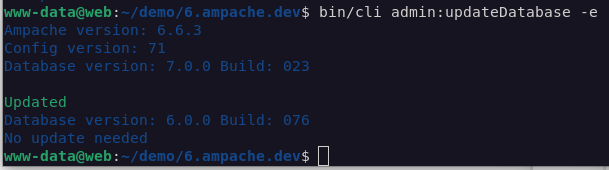
There is now the ability to downgrade your database from Ampache7 back to Ampache6 using the cli.
If you want to go back and wait for a newer release simply run the update command and the database will be downgraded to match your version.
php bin/cli admin:updateDatabase -e
PHP Version support
The first major change is that Ampache7 supports PHP8.2+ ONLY!
Builds will no longer support other versions. Stay on Ampache6 until you can move your server.
You can stay on the patch6 or release6 branch by checking out the git branch.
git checkout origin/patch6
PHP zip extension is required
To make sure zip downloads are still available cross platform, the core php zip module is being used.
On Linux the module is usually called php-zip and is now required whether you enable zip downloads or not in the config.
NPM is required for JS package installation
When you update Ampache you need to add another step to the update processes.
In addition to composer install you need to update the NPM packages.
The minimum nodejs version is v15 or higher and supported packages are available in:
- Debian bookworm (stable)
- Ubuntu 23.10
- Ubuntu LTS 24.04
Check your version prior to upgrading.

When you're updating from git add the npm commands to the end of your scripts.
cd /var/www/ampache
git pull
composer install --no-dev --prefer-source --no-interaction
npm install
npm run build
Check out update_from_git.sh for an updated example.
NOTE The commands to update NPM packages can't be triggered by PHP, so the first time you install from Git you must run the npm commands from the cli. (or use a zip package) This should be resolved now in Ampache 7.4.0+
New release type CLIENT
With Ampache7 you can build your own API client and use it in the base url instead of as a sub folder.
This will be documented and expanded further in time but you can use it right now if you're knowledgable enough with a web server
Clips, Movie, TV and Personal Video types have been removed
As Ampache focuses on music, it has been decided to remove the additional video types and provide one option for video catalogs.

The removal of these types allow Ampache to continue to offer basic video support.
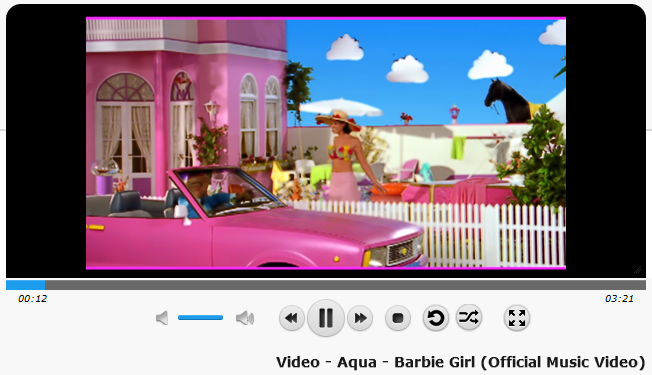
Jellyfin is our highly recommended alternative and has much more advanced video features.
There is no API7 only API6! (...and 5, 4 and 3 too)
The Ampache API is not breaking anything with this release.
This will be the first time that the API and Ampache do not have the same version number.
Ampache versions will be 7.x.x and API6 will remain the default API version. (Currently 6.5.0)
If you send a version 7 API call you will be downgraded to API6 instead of getting an error.

If Ampache8 requires major changes the version will bump from 6 to 8 to match the next major release and skipping API7 entirely. (Or continue extending API6 if it lasts that long.)
Image links for user's have changed
Do you use your user profile picture in other areas? (I like to use may avatar as a custom logo up there in the corner.)
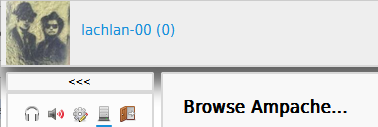
The old links used the show action like all other objects
https://music.com.au/image.php?action=show&object_id=1&thumb=4
Ampache7 user avatar links now use their own action
https://music.com.au/image.php?action=show_user_avatar&object_id=1&thumb=4
API errorMessage fields are not translated
API6 Errors return an error object with the following parts:
errorCode: numeric codeerrorAction: method that caused the errorerrorType: further information such as the type of data missing or access level requirederrorMessage: translated error message
It's been decided to keep the errorMessage in US English and NOT translate the messages.
This is a change in behavior but is not considered breaking as the errorMessage could not be considered consistent.
Now it can be used for more complicated error handling.
New Config Options
; By defualt Ampache doesn't install dev packages using the --no-dev parameter
; disable this setting to install dev packages (e.g. composer install --prefer-source --no-interaction)
; DEFAULT: "true"
composer_no_dev = "true"
; This value allows to override the npm binary path to distinguish between multiple npm versions
; Either a binary name in $PATH as well as a fully qualified path is possible
; DEFAULT: npm
npm_binary_path = "npm"
; Set a default table engine for your database
; Don't change this unless you understand how to BACKUP and RESTORE a database!
; DEFAULT: "InnoDB"
database_engine = "InnoDB"
; Webplayer Access Level
; Set a minimum access level required to access the webplayer.
; When a user does not meet the access requirements then you
; are blocked from using the webplayer.
; NOTE: This setting is ignored if you disable use_auth
; POSSIBLE VALUES: guest, user, content_manager, manager, admin
; DEFAULT: "user"
webplayer_level = "user"
- Other changes of note in the config file
user_create_streamtokenis enabled by default now so all new users will have a streaming token.waveform_drawflatwas hardcoded to true in and doesn't 'seem' to do anything
New CLI commands
The CLI has had a lot of updates allowing you to do a lot more admin work without having to log in.
These new commands are geared around being able to do things without manually clicking through the interface.
admin:updateConfigFile
Update the Ampache config file if there is a version update
php bin/cli admin:updateConfigFile --execute
admin:updatePlugins
Update Plugins automatically if they require an update
php bin/cli admin:updatePlugins --execute
admin:listUsers
Print out a list of active users or an individual user searching by username.
php bin/cli admin:listUsers some-username
You can also search by id using --user parameter
php bin/cli admin:listUsers -u 5
admin:updatePreferenceAccessLevel
This command will update the preference access level which will block users who do not meet the requirements from changing their values.
You can also reset the access level to the Ampache defaults which copies the levels from a fresh install
- Available
--leveloptions- default (Ampache database)
- guest
- user
- content_manager
- manager
- admin
php bin/cli admin:updatePreferenceAccessLevel --level admin
admin:resetPreferences
Reset preference values for a user based on selected presets.
The system preset will match the current site preference values from the admin preference pages. (e.g. preferences.php?action=admin&tab=interface)
admin:resetPreferences some-user --preset default
- Available
--presetoptions- system
- default
- minimalist
- community'
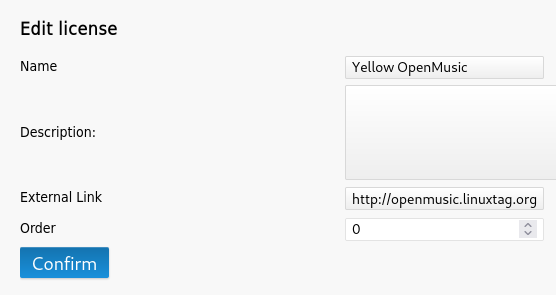
The license list can be reordered
There is now a column for ordering the licenses instead of ordering alphabetically.
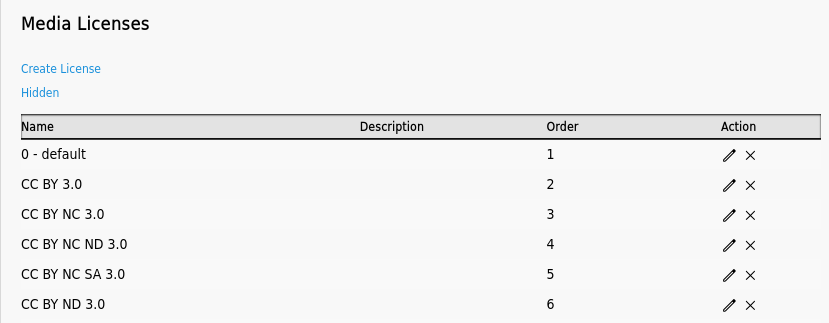
You can also hide them instead of deleting them completely. (Order 0 = hidden)
You can unhide by following the Hidden link on the manage license page
New Options
New site options and preferences are documented in wiki at ampache7-for-users