Installing Ampache
Installing Ampache 8
This document is built to help you install to your local server.
Alternative installations can be found here:
- A pre-built docker repo is also available.
- Ampache 4 Installation
Already running Ampache? Read Upgrading instead, and check Ampache8 for Admins for the changes that can block an upgrade.
- Prepare the web server Prerequisites
- Configure the web server Web Server Configuration
- Configure Ampache Web-based Installer
Prerequisites
-
A web server. All of the following have been used, though Ampache receives the most testing with Apache:
- Apache
- lighttpd
- nginx
- IIS
-
PHP 8.5+ only. Ampache8 does not run on any earlier release and its builds no longer ship for one. Ampache 7 covered PHP 7.4 to 8.4; if you are stuck on one of those, see Staying on Ampache7 instead
-
Required PHP modules (the
ext-requirements of composer.json, plus the MySQL driver and the modules the installer checks):- curl
- dom
- fileinfo (required from Ampache 8.0.0 for the new captcha, usually included in PHP)
- gd
- gettext
- hash (included in PHP)
- iconv
- intl
- json (for php8.0+ php-json is part of the base php package)
- libxml
- mbstring
- openssl
- PDO
- PDO_MYSQL
- session (included in PHP)
- simplexml
- xml
- zip (required from Ampache 7.0.0, whether or not you enable zip downloads)
- zlib
-
Optional PHP modules (Ampache runs without them, the feature named does not):
- http (Yourls plugin)
- ldap (LDAP authentication)
- sockets (UPnP)
- xmlreader (UPnP)
Once Ampache is running, Admin -> Server Config -> Ampache Debug lists every one of these modules and whether this server has it.
-
For FreeBSD The following php modules must be loaded:
- php-xml
- php-dom
- php-intl
- MySQL
-
Supported databases:
- MySQL 8.x or later
- MariaDB 10.x or later
Using Debian? This should cover you
sudo apt install apache2 cron ffmpeg flac gosu inotify-tools lame libavcodec-extra libev-libevent-dev libflac-dev libmp3lame-dev libtheora-dev libvorbis-dev libvpx-dev php8.5 php8.5-curl php8.5-gd php8.5-ldap php8.5-mbstring php8.5-mysql php8.5-xml php8.5-zip php8.5-intl vorbis-tools zip unzip
sudo a2enmod rewrite
NOTE the unversioned php package installs whatever your distribution ships, which is almost certainly older than 8.5 today. Read the next section before you install it.
You don't have to use the PHP your OS ships
The unversioned php package installs whatever version your distribution decided on, which is often older than Ampache needs.
You are not stuck with it, and you don't have to upgrade the whole operating system to move forward.
Two third party repositories package current PHP for the major distributions, both maintained by the people who package PHP for those distributions.
- Debian and Ubuntu: Sury (
packages.sury.orgon Debian, theppa:ondrej/phpPPA on Ubuntu) - RHEL, Rocky, Alma and Fedora: Remi
Both keep versions co-installable, so the new PHP goes on beside the system one rather than replacing it.
Install the versioned packages (php8.5-curl rather than php-curl) and point your web server at that version.
The Ampache8 for Admins page has the full commands for PHP 8.5.
Download Ampache
Release tarballs are available at github.com. Depending on the feature and how recently it's changed, support might only be available for git HEAD.
You can grab the latest code for each branch directly:
Management of your deployment can be much easier if you use a git checkout rather than a tarball.
These commands will check out the latest Ampache code without having to download or unpack a zip file:
git clone -b develop https://github.com/ampache/ampache.git ampache— Ampache8, the current mainlinegit clone -b release7 https://github.com/ampache/ampache.git ampache— Ampache7, if you can't move to PHP 8.5 yetgit clone -b release6 https://github.com/ampache/ampache.git ampache— Ampache6
NOTE develop used to be Ampache7 and the Ampache8 work lived on develop8. That is no longer true: Ampache8 is the mainline, develop is Ampache8 and Ampache7 is maintained on release7/patch7.
Install Composer
Composer2 is used to manage dependencies. Composer1 has a few issues now and is likely to cause you issues.
Download it and install it (e.g: mv composer.phar /usr/local/bin/composer)
If you cannot use Composer, you should download the release archive ampache-x.x.x_phpx.x.zip (named ampache-x.x.x_all_phpx.x.zip before Ampache9, see which zip) which contains all dependencies.
For Mac users (High Sierra & Mojave) - brew install composer
NPM is required for JS package installation
Since Ampache 7.0.0 the front-end packages are installed with npm, so a git checkout needs an npm step as well as a composer one.
Ampache8 builds its assets with Vite 8, which needs Node.js ^20.19.0 or >=22.12.0. Anything older will fail at npm run build.
Check your version prior to upgrading.
node --version
npm --version

When you're updating from git add the npm commands to the end of your scripts.
cd /var/www/ampache
git pull
composer install --no-dev --prefer-dist --no-interaction
npm install
npm run build
npm run verify:install checks the result and reports anything that did not land.
Check out update_from_git.sh for an updated example.
Emplacement
The project root folder of the Ampache is not the web root anymore.
The new folder is public which is a subfolder of the project root.
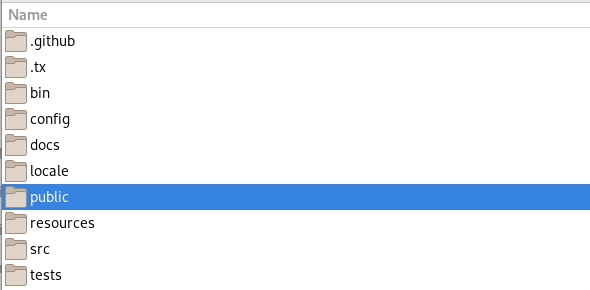
This has been the layout since Ampache 5, and it is still how Ampache8 is laid out. You just need a bit better understanding of how the webserver serves your folders
The simple way is just to chuck it all in /var/www and link to your default html/httpd folder (if you're serving more than one website this will overwrite everything)
Here's an easy example that covers a Debian/Ubuntu webserver
wget https://getcomposer.org/download/latest-stable/composer.phar
sudo mv composer.phar /usr/local/bin/composer
sudo chmod +x /usr/local/bin/composer
sudo chown www-data:www-data /var/www -R
sudo su - www-data -s /bin/bash
cd /var/www
git clone -b develop https://github.com/ampache/ampache.git ampache
mv /var/www/html /var/www/html_before_ampache
ln -s /var/www/ampache/public /var/www/html
cd ampache
composer install
npm install
npm run build
You now have an Ampache 8 server ready to install. (http://localhost if you followed these commands)
MySQL database creation
Don't know how to set up MariaDB? Need it on the same server? Lets install it
sudo apt install mariadb-server
sudo mariadb-secure-installation
You will see the following
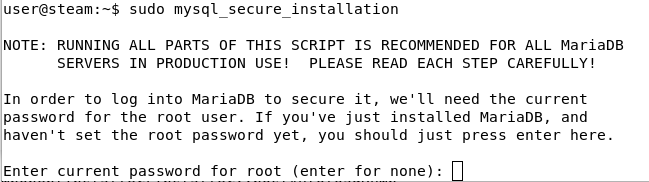
- "Enter current password for root (enter for none):" Press enter for no password
- "Switch to unix_socket authentication [Y/n]" Another no
- "Change the root password? [Y/n]" Yes we want a password

The rest is up to you but if you are using a different server for your webserver you will probably need to answer no to keep remote root access

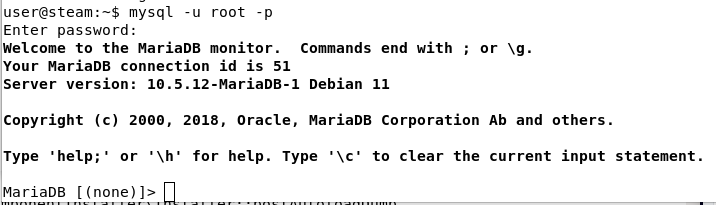
Now you can test logon using your new password
mysql -u root -p
Get this? You can install Ampache using the web-based installer!
Web server configuration
After you follow the web installation make sure you check out the Basic Configuration for some tips on editing you config file
Apache
Go to your web browser and direct it at the Ampache install page. For instance, if the local IP of your Ampache install is on IP 192.168.1.100, you would enter: http://192.168.1.100/install.php
Ampache is developed to work instantly with Apache without additional configuration except setting up a regular vhost.
Some features requires url rewriting to work correctly. It is highly recommended to enable it.
Streaming, the Subsonic API and the REST API all stop working without it, usually with a 404 from every request.
Rewrite Rules covers what rewriting does, which paths need it, and how to set it up for Apache, nginx and other webservers.
- Be sure mod_rewrite is enabled on your Apache installation. Otherwise install/activate it and restart your Apache service
- Check that Ampache website is allowed to override Apache settings (
AllowOverride Allin vhost config file for instance)
If you followed the easy example for a Debian/Ubuntu webserver above (see: Emplacement):
- mod_rewrite should be enabled, but you can check with
sudo apache2ctl -Mfor the linerewrite_module (shared). - The server config file is /etc/apache2/sites-enabled/000-default.conf and the following lines need to be added for the .htaccess files to take effect and the url rewriting to work correctly:
<Directory /var/www>
        AllowOverride All
</Directory>
Issues have been reported in recent Apache versions. issue 3993
In your server conf you can bypass that security measure by enabling ap_trust_cgilike_cl
<Directory /var/www/ampache/public/play>
    SetEnv ap_trust_cgilike_cl 1
</Directory>
Catalog updates report progress over Server-Sent Events, which Apache's mod_proxy_fcgi buffers by default: progress arrives all at once when the scan finishes instead of live, or not at all until the connection times out.
Add flushpackets=on to the same php-fpm worker your SetHandler/ProxyPassMatch directive already connects through:
<Proxy "unix:/run/php/php8.5-fpm.sock|fcgi://localhost">
    ProxySet flushpackets=on
</Proxy>
If you would rather start from a complete vhost, docs/examples/apache-site.conf is a working one.
It carries the ap_trust_cgilike_cl setting above, php-fpm and websocket wiring, and the rules that keep config, src and vendor from being served.
Those last ones matter most if you installed from a release zip, where the whole install sits in the web root rather than a level above it.
They are in public/.htaccess.dist as well, so a vhost with AllowOverride All gets them either way, once you ask for that file.
php bin/installer htaccess -e -p
This one is optional. Ampache runs the same without it, so skip it if the layout puts nothing private in your web root.
Rewrite Rules covers what is blocked and how to check it.
Nginx
Working Nginx configuration sample for Ampache.
If Ampache is served behind a reverse proxy using SSL, you will have to uncomment fastcgi_param HTTPS on; to prevent mixed content to be served.
The canonical copy of this block is docs/examples/nginx-site.conf in the Ampache repository.
Check it against your config after an upgrade, because REST paths change between releases.
server {
    # EXAMPLE TAKEN FROM
    # https://ampache.org/docs/installation/#nginx

    # listen to
    listen  [::]:used_port; #ssl; ipv6 optional with ssl enabled
    listen       used_port; #ssl; ipv4 optional with ssl enabled

    server_name my_server_name;
    charset utf-8;

    # Logging, error_log mode [notice] is necessary for rewrite_log on,
    # (very usefull if rewrite rules do not work as expected)
    error_log       /var/log/ampache/error.log; # notice;
    # access_log      /var/log/ampache/access.log;
    # rewrite_log     on;

    # ssl_protocols TLSv1.3 TLSv1.2;
    # ssl_certificate         /path/to/fullchain.pem;
    # ssl_certificate_key     /path/to/privkey.pem;
    # ssl_trusted_certificate /path/to/chain.pem;

    # Use secure SSL/TLS settings, see https://mozilla.github.io/server-side-tls/ssl-config-generator/
    # Medium Security:
    # ssl_ciphers 'ECDHE-ECDSA-AES256-GCM-SHA384:ECDHE-RSA-AES256-GCM-SHA384:ECDHE-ECDSA-CHACHA20-POLY1305:ECDHE-RSA-CHACHA20-POLY1305:ECDHE-ECDSA-AES128-GCM-SHA256:ECDHE-RSA-AES128-GCM-SHA256:ECDHE-ECDSA-AES256-SHA384:ECDHE-RSA-AES256-SHA384:ECDHE-ECDSA-AES128-SHA256:ECDHE-RSA-AES128-SHA256';
    # Strong Security:
    # ssl_ciphers 'TLS-CHACHA20-POLY1305-SHA256:TLS-AES-256-GCM-SHA384:ECDHE-RSA-AES256-GCM-SHA512:DHE-RSA-AES256-GCM-SHA512:ECDHE-RSA-AES256-GCM-SHA384:DHE-RSA-AES256-GCM-SHA384';
    # ssl_ecdh_curve X448:secp521r1:secp384r1;
    # ssl_stapling on;
    # ssl_stapling_verify on;
    # ssl_prefer_server_ciphers on;
    # add_header Strict-Transport-Security max-age=15768000;
    # etc.

    # Use secure headers to avoid XSS and many other things
    add_header X-Content-Type-Options nosniff;
    add_header X-XSS-Protection "1; mode=block";
    add_header X-Robots-Tag none;
    add_header X-Download-Options noopen;
    add_header X-Permitted-Cross-Domain-Policies none;
    add_header X-Frame-Options "SAMEORIGIN" always;
    add_header Referrer-Policy "no-referrer";
    add_header Content-Security-Policy "script-src 'self' 'unsafe-inline' 'unsafe-eval'; frame-src 'self'; object-src 'self'";

    # Avoid information leak
    server_tokens off;
    fastcgi_hide_header X-Powered-By;

    # Point this at the web root, which depends on the layout you installed:
    #   git checkout / composer install  -> /path/to/ampache/public
    #   release zip (squashed)           -> /path/to/ampache
    root /path/to/ampache/root/directory;
    index index.php;

    # Somebody said this helps, in my setup it doesn't prevent temporary saving in files
    proxy_max_temp_file_size 0;

    # Rewrite rules for the Ampache REST API and the Subsonic backend.
    # These mirror public/rest/.htaccess.dist; keep the two in sync when adding a route.
    # Order matters: the versioned REST routes must be matched before the Subsonic catch-alls.
    if ( !-e $request_filename ) {
        # /{version}/{format}/catalogs/{catalog_id}/browse/{object_type}/{object_id}
        rewrite ^/rest/(3|4|5|6|8)/(json|xml)/catalogs/(-?[0-9]+)/browse/([^/]+)/(-?[0-9]+)/?$ /server/$2.rest.php?version=$1&action=browse&filter=$5&type=$4&catalog=$3 last;
        # /{version}/{format}/me/(playlists|smartlists)
        rewrite ^/rest/(3|4|5|6|8)/(json|xml)/me/(playlists|smartlists)/?$ /server/$2.rest.php?version=$1&action=user_$3 last;
        # /{version}/{format}/me/(now-playing|last-shouts|friends-timeline|lost-password)
        rewrite ^/rest/(3|4|5|6|8)/(json|xml)/me/(now-playing|last-shouts|friends-timeline|lost-password)/?$ /server/$2.rest.php?version=$1&action=$3 last;
        # /{version}/{format}/preferences/(system|user)
        rewrite ^/rest/(3|4|5|6|8)/(json|xml)/preferences/(system|user)/?$ /server/$2.rest.php?version=$1&action=$3_preferences last;
        # /{version}/{format}/{type}/(deleted|stats|search|system|user)
        rewrite ^/rest/(3|4|5|6|8)/(json|xml)/([^/]+)/(deleted|stats|search|system|user)/?$ /server/$2.rest.php?version=$1&action=$4&type=$3 last;
        # /{version}/{format}/folders/{integer}
        rewrite ^/rest/(3|4|5|6|8)/(json|xml)/folders/(-?[0-9]+)/?$ /server/$2.rest.php?version=$1&action=folders&filter=$3 last;
        # /{version}/{format}/folders{path}
        rewrite ^/rest/(3|4|5|6|8)/(json|xml)/folders(.+)/?$ /server/$2.rest.php?version=$1&action=folders&filter=$3 last;
        # /{version}/{format}/localplay/songs -> its own action (a sub-resource, not a `localplay/{command}`)
        rewrite ^/rest/(3|4|5|6|8)/(json|xml)/localplay/songs/?$ /server/$2.rest.php?version=$1&action=localplay_songs last;
        # /{version}/{format}/{type}/{filter}/{action}
        rewrite ^/rest/(3|4|5|6|8)/(json|xml)/([^/]+)/([^/]+)/([^/]+)/?$ /server/$2.rest.php?version=$1&action=$5&type=$3&filter=$4 last;
        # /{version}/{format}/{action}/{filter}
        rewrite ^/rest/(3|4|5|6|8)/(json|xml)/([^/]+)/([^/]+)/?$ /server/$2.rest.php?version=$1&action=$3&filter=$4 last;
        # /{version}/{format}/{action}
        rewrite ^/rest/(3|4|5|6|8)/(json|xml)/([^/]+)/?$ /server/$2.rest.php?version=$1&action=$3 last;
        # /{version}/{format} with no resource at all (e.g. opening the api url in a browser); the handler pings
        rewrite ^/rest/(3|4|5|6|8)/(json|xml)/?$ /server/$2.rest.php?version=$1 last;
        # subsonic clients using *.view
        rewrite ^/rest/([^/]+)\.view$ /rest/index.php?ssaction=$1 last;
        # some subsonic clients don't use *.view
        rewrite ^/rest/([^/]+)/?$ /rest/index.php?ssaction=$1 last;
        rewrite ^/rest/fake/(.+)$ /play/$1 last;
    }

    # Beautiful URL Rewriting
    rewrite ^/play/ssid/(\w+)/type/(\w+)/oid/([0-9]+)/uid/([0-9]+)/name/(.*)$ /play/index.php?ssid=$1&type=$2&oid=$3&uid=$4&name=$5 last;
    rewrite ^/play/ssid/(\w+)/type/(\w+)/oid/([0-9]+)/uid/([0-9]+)/client/(\w+)/name/(.*)$ /play/index.php?ssid=$1&type=$2&oid=$3&uid=$4&client=$5&name=$6 last;
    rewrite ^/play/ssid/(\w+)/type/(\w+)/oid/([0-9]+)/uid/([0-9]+)/client/(\w+)/player/(.*)/name/(.*)$ /play/index.php?ssid=$1&type=$2&oid=$3&uid=$4&client=$5&player=$6&name=$7 last;
    rewrite ^/play/ssid/(\w+)/type/(\w+)/oid/([0-9]+)/uid/([0-9]+)/client/(\w+)/bitrate/([0-9]+)/player/(.*)/name/(.*)$ /play/index.php?ssid=$1&type=$2&oid=$3&uid=$4&client=$5&bitrate=$6&player=$7&name=$8 last;
    rewrite ^/play/ssid/(\w+)/type/(\w+)/oid/([0-9]+)/uid/([0-9]+)/client/(\w+)/transcode_to/(\w+)/bitrate/([0-9]+)/player/(.*)/name/(.*)$ /play/index.php?ssid=$1&type=$2&oid=$3&uid=$4&client=$5&transcode_to=$6&bitrate=$7&player=$8&name=$9 last;
    rewrite ^/play/ssid/(\w+)/type/(\w+)/oid/([0-9]+)/uid/([0-9]+)/client/(\w+)/noscrobble/([0-1])/name/(.*)$ /play/index.php?ssid=$1&type=$2&oid=$3&uid=$4&client=$5&noscrobble=$6&name=$7 last;
    rewrite ^/play/ssid/(\w+)/type/(\w+)/oid/([0-9]+)/uid/([0-9]+)/client/(\w+)/noscrobble/([0-1])/player/(.*)/name/(.*)$ /play/index.php?ssid=$1&type=$2&oid=$3&uid=$4&client=$5&noscrobble=$6&player=$7&name=$8 last;
    rewrite ^/play/ssid/(\w+)/type/(\w+)/oid/([0-9]+)/uid/([0-9]+)/client/(\w+)/noscrobble/([0-1])/bitrate/([0-9]+)/player/(.*)/name/(.*)$ /play/index.php?ssid=$1&type=$2&oid=$3&uid=$4&client=$5&noscrobble=$6&bitrate=$7&player=$8&name=$9 last;
    rewrite ^/play/ssid/(\w+)/type/(\w+)/oid/([0-9]+)/uid/([0-9]+)/client/(\w+)/noscrobble/([0-1])/transcode_to/(\w+)/bitrate/([0-9]+)/player/(.*)/name/(.*)$ /play/index.php?ssid=$1&type=$2&oid=$3&uid=$4&client=$5&noscrobble=$6&transcode_to=$7&bitrate=$8&player=$9&name=$10 last;

    # the following line was needed for me to get downloads of single songs to work
    rewrite ^/play/ssid/(.*)/type/(.*)/oid/([0-9]+)/uid/([0-9]+)/action/(.*)/name/(.*)$ /play/index.php?ssid=$1&type=$2&oid=$3&uid=$4action=$5&name=$6 last;
    # These mirror public/play/.htaccess.dist; keep the two in sync.
    location /play {
        if (!-e $request_filename) {
            rewrite ^/play/art/([^/]+)/user/([0-9]+)/thumb([0-9]*)\.([a-z]+)$ /image.php?action=show_user_avatar&object_id=$2&auth=$1&thumb=$3 last;
            rewrite ^/play/art/([^/]+)/user/([0-9]+)/size([0-9]+x[0-9]+)\.([a-z]+)$ /image.php?action=show_user_avatar&object_id=$2&auth=$1&size=$3 last;
            rewrite ^/play/art/([^/]+)/([^/]+)/([0-9]+)/thumb([0-9]*)\.([a-z]+)$ /image.php?object_type=$2&object_id=$3&auth=$1&thumb=$4&name=art.jpg last;
            rewrite ^/play/art/([^/]+)/([^/]+)/([0-9]+)/size([0-9]+x[0-9]+)\.([a-z]+)$ /image.php?object_type=$2&object_id=$3&auth=$1&size=$4&name=art.jpg last;
        }

        rewrite ^/([^/]+)/([^/]+)/([^/]+)/([^/]+)(/.*)?$ /play/$5?$1=$2&$3=$4;
        rewrite ^/([^/]+)/([^/]+)(/.*)?$ /play/$3?$1=$2;
        rewrite ^/(/[^/]+|[^/]+/|/?)$ /play/index.php last;
        break;
    }

   # The REST API maps PUT to *_create, PATCH to *_edit and DELETE to *_delete,
   # so those verbs have to be allowed through as well as GET/POST.
   location /rest {
      limit_except GET POST PUT PATCH DELETE HEAD {
         deny all;
      }
   }

   # Catalog updates report progress over server-sent events; buffering breaks the stream.
   location = /server/sse.server.php {
      fastcgi_buffering off;
      gzip off;
      fastcgi_read_timeout 3600s;

      include fastcgi_params;
      fastcgi_param SCRIPT_FILENAME $document_root$fastcgi_script_name;
      fastcgi_param HTTP_PROXY "";
      fastcgi_pass unix:/var/run/php-fpm.sock;
   }

   location ^~ /bin/ {
      deny all;
      return 403;
   }

   location ^~ /config/ {
      deny all;
      return 403;
   }

   # Only reachable in the squashed (release zip) layout, where the repo root is also the
   # web root. Harmless to keep when serving from public/.
   location ~ ^/(docker|docs|locale|node_modules|resources|src|tests|vendor)(/|$) {
      deny all;
      return 403;
   }

   location ~ ^/(composer\.(json|lock)|package(-lock)?\.json|phpunit\.xml|rector\.php|vite\.config\.js)$ {
      deny all;
      return 403;
   }

   # Dotted paths (.git, .env, .idea) at any depth, leaving the acme-challenge webroot reachable so certbot can renew.
   location ~ /\.(?!well-known) {
      deny all;
      return 403;
   }

   # Editor and backup leftovers beside a real file, and ampache.cfg.php if php ever stops running.
   location ~ \.cfg\.php$|\.(bak|old|orig|save|swp|swo|sql|log|ini|neon|sh|dist|cache|md|lock)$ {
      deny all;
      return 403;
   }

   location / {
      limit_except GET POST HEAD {
         deny all;
      }
   }

   location ~ ^/.*.php {
        fastcgi_index index.php;

        # sets the timeout for requests in [s] , 60s are normally enough
        fastcgi_read_timeout 600s;

        include fastcgi_params;
        fastcgi_param SCRIPT_FILENAME $document_root$fastcgi_script_name;

        # Mitigate HTTPOXY https://httpoxy.org/
        fastcgi_param HTTP_PROXY "";

        # has to be set to on if encryption (https) is used:
        # fastcgi_param HTTPS on;

        fastcgi_split_path_info ^(.+?\.php)(/.*)$;

        # chose as your php-fpm is configured to listen on
        fastcgi_pass unix:/var/run/php-fpm.sock;
        # fastcgi_pass 127.0.0.1:8000/;
   }

   # Rewrite rule for WebSocket
   location /ws {
        rewrite ^/ws/(.*) /$1 break;
        proxy_http_version 1.1;
        proxy_set_header Upgrade $http_upgrade;
        proxy_set_header Connection "upgrade";
        proxy_set_header Host $host;
        proxy_pass http://127.0.0.1:8100/;
   }
}
Lighttpd
Working lighttpd 1.4 configuration sample for Ampache.
The canonical copy of this block is docs/examples/lighttpd-site.conf in the Ampache repository.
It needs mod_rewrite, mod_access and mod_fastcgi loaded in lighttpd.conf.
# EXAMPLE TAKEN FROM
# https://ampache.org/docs/installation/#lighttpd
#
# lighttpd 1.4. Include it from lighttpd.conf, or paste the block into it.
# These modules have to be loaded first:
#   server.modules += ( "mod_rewrite", "mod_access", "mod_fastcgi" )

$HTTP["host"] == "ampache.example.com" {

    # Point this at the web root, which depends on the layout you installed:
    #   git checkout / composer install  -> /path/to/ampache/public
    #   release zip (squashed)           -> /path/to/ampache
    server.document-root = "/path/to/ampache/public"

    index-file.names = ( "index.php" )

    # PRIVATE PATHS
    # Only reachable in the squashed (release zip) layout, where the install root is also the
    # web root. Serving from public/ these paths do not exist and the rules cost nothing.
    $HTTP["url"] =~ "^/(bin|config|docker|docs|locale|node_modules|resources|src|tests|vendor)/" {
        url.access-deny = ("")
    }

    $HTTP["url"] =~ "^/(composer\.(json|lock)|package(-lock)?\.json|phpunit\.xml|rector\.php|vite\.config\.js)$" {
        url.access-deny = ("")
    }

    # Dotted paths (.git, .env, .idea) at any depth, leaving the acme-challenge webroot reachable so certbot can renew.
    $HTTP["url"] =~ "/\.(?!well-known)" {
        url.access-deny = ("")
    }

    # Editor and backup leftovers beside a real file, and ampache.cfg.php if php ever stops running.
    url.access-deny = (".bak", ".old", ".orig", ".save", ".swp", ".swo", ".sql", ".log", ".ini", ".neon", ".sh", ".dist", ".cache", ".md", ".lock", ".cfg.php")

    # These mirror public/rest/.htaccess.dist and public/play/.htaccess.dist; keep them in sync.
    # Order matters: the versioned REST routes must be matched before the Subsonic catch-alls.
    url.rewrite-if-not-file = (
        # /{version}/{format}/catalogs/{catalog_id}/browse/{object_type}/{object_id}
        "^/rest/(3|4|5|6|8)/(json|xml)/catalogs/(-?[0-9]+)/browse/([^/]+)/(-?[0-9]+)/?$" => "/server/$2.rest.php?version=$1&action=browse&filter=$5&type=$4&catalog=$3",
        # /{version}/{format}/me/(playlists|smartlists)
        "^/rest/(3|4|5|6|8)/(json|xml)/me/(playlists|smartlists)/?$" => "/server/$2.rest.php?version=$1&action=user_$3",
        # /{version}/{format}/me/(now-playing|last-shouts|friends-timeline|lost-password)
        "^/rest/(3|4|5|6|8)/(json|xml)/me/(now-playing|last-shouts|friends-timeline|lost-password)/?$" => "/server/$2.rest.php?version=$1&action=$3",
        # /{version}/{format}/preferences/(system|user)
        "^/rest/(3|4|5|6|8)/(json|xml)/preferences/(system|user)/?$" => "/server/$2.rest.php?version=$1&action=$3_preferences",
        # /{version}/{format}/{type}/(deleted|stats|search|system|user)
        "^/rest/(3|4|5|6|8)/(json|xml)/([^/]+)/(deleted|stats|search|system|user)/?$" => "/server/$2.rest.php?version=$1&action=$4&type=$3",
        # /{version}/{format}/folders/{integer}
        "^/rest/(3|4|5|6|8)/(json|xml)/folders/(-?[0-9]+)/?$" => "/server/$2.rest.php?version=$1&action=folders&filter=$3",
        # /{version}/{format}/folders{path}
        "^/rest/(3|4|5|6|8)/(json|xml)/folders(.+)/?$" => "/server/$2.rest.php?version=$1&action=folders&filter=$3",
        # /{version}/{format}/localplay/songs -> its own action (a sub-resource, not a `localplay/{command}`)
        "^/rest/(3|4|5|6|8)/(json|xml)/localplay/songs/?$" => "/server/$2.rest.php?version=$1&action=localplay_songs",
        # /{version}/{format}/{type}/{filter}/{action}
        "^/rest/(3|4|5|6|8)/(json|xml)/([^/]+)/([^/]+)/([^/]+)/?$" => "/server/$2.rest.php?version=$1&action=$5&type=$3&filter=$4",
        # /{version}/{format}/{action}/{filter}
        "^/rest/(3|4|5|6|8)/(json|xml)/([^/]+)/([^/]+)/?$" => "/server/$2.rest.php?version=$1&action=$3&filter=$4",
        # /{version}/{format}/{action}
        "^/rest/(3|4|5|6|8)/(json|xml)/([^/]+)/?$" => "/server/$2.rest.php?version=$1&action=$3",
        # /{version}/{format} with no resource at all (e.g. opening the api url in a browser); the handler pings
        "^/rest/(3|4|5|6|8)/(json|xml)/?$" => "/server/$2.rest.php?version=$1",
        # subsonic clients using *.view
        "^/rest/([^/]+)\.view$" => "/rest/index.php?ssaction=$1",
        # some subsonic clients don't use *.view
        "^/rest/([^/]+)/?$" => "/rest/index.php?ssaction=$1",
        "^/rest/fake/(.+)$" => "/play/$1",

        # Art and avatar urls
        "^/play/art/([^/]+)/user/([0-9]+)/thumb([0-9]*)\.([a-z]+)$" => "/image.php?action=show_user_avatar&object_id=$2&auth=$1&thumb=$3",
        "^/play/art/([^/]+)/user/([0-9]+)/size([0-9]+x[0-9]+)\.([a-z]+)$" => "/image.php?action=show_user_avatar&object_id=$2&auth=$1&size=$3",
        "^/play/art/([^/]+)/([^/]+)/([0-9]+)/thumb([0-9]*)\.([a-z]+)$" => "/image.php?object_type=$2&object_id=$3&auth=$1&thumb=$4&name=art.jpg",
        "^/play/art/([^/]+)/([^/]+)/([0-9]+)/size([0-9]+x[0-9]+)\.([a-z]+)$" => "/image.php?object_type=$2&object_id=$3&auth=$1&size=$4&name=art.jpg",

        # Beautiful URL Rewriting. lighttpd applies one rewrite per request, so each shape is
        # listed in full rather than peeling off one key/value pair at a time like Apache does.
        "^/play/ssid/(\w+)/type/(\w+)/oid/([0-9]+)/uid/([0-9]+)/name/(.*)$" => "/play/index.php?ssid=$1&type=$2&oid=$3&uid=$4&name=$5",
        "^/play/ssid/(\w+)/type/(\w+)/oid/([0-9]+)/uid/([0-9]+)/client/(\w+)/name/(.*)$" => "/play/index.php?ssid=$1&type=$2&oid=$3&uid=$4&client=$5&name=$6",
        "^/play/ssid/(\w+)/type/(\w+)/oid/([0-9]+)/uid/([0-9]+)/client/(\w+)/player/(.*)/name/(.*)$" => "/play/index.php?ssid=$1&type=$2&oid=$3&uid=$4&client=$5&player=$6&name=$7",
        "^/play/ssid/(\w+)/type/(\w+)/oid/([0-9]+)/uid/([0-9]+)/client/(\w+)/bitrate/([0-9]+)/player/(.*)/name/(.*)$" => "/play/index.php?ssid=$1&type=$2&oid=$3&uid=$4&client=$5&bitrate=$6&player=$7&name=$8",
        "^/play/ssid/(\w+)/type/(\w+)/oid/([0-9]+)/uid/([0-9]+)/client/(\w+)/transcode_to/(\w+)/bitrate/([0-9]+)/player/(.*)/name/(.*)$" => "/play/index.php?ssid=$1&type=$2&oid=$3&uid=$4&client=$5&transcode_to=$6&bitrate=$7&player=$8&name=$9",
        "^/play/ssid/(\w+)/type/(\w+)/oid/([0-9]+)/uid/([0-9]+)/client/(\w+)/noscrobble/([0-1])/name/(.*)$" => "/play/index.php?ssid=$1&type=$2&oid=$3&uid=$4&client=$5&noscrobble=$6&name=$7",
        "^/play/ssid/(\w+)/type/(\w+)/oid/([0-9]+)/uid/([0-9]+)/client/(\w+)/noscrobble/([0-1])/player/(.*)/name/(.*)$" => "/play/index.php?ssid=$1&type=$2&oid=$3&uid=$4&client=$5&noscrobble=$6&player=$7&name=$8",
        "^/play/ssid/(\w+)/type/(\w+)/oid/([0-9]+)/uid/([0-9]+)/client/(\w+)/noscrobble/([0-1])/bitrate/([0-9]+)/player/(.*)/name/(.*)$" => "/play/index.php?ssid=$1&type=$2&oid=$3&uid=$4&client=$5&noscrobble=$6&bitrate=$7&player=$8&name=$9",
        "^/play/ssid/(\w+)/type/(\w+)/oid/([0-9]+)/uid/([0-9]+)/client/(\w+)/noscrobble/([0-1])/transcode_to/(\w+)/bitrate/([0-9]+)/player/(.*)/name/(.*)$" => "/play/index.php?ssid=$1&type=$2&oid=$3&uid=$4&client=$5&noscrobble=$6&transcode_to=$7&bitrate=$8&player=$9&name=$10",
        "^/play/ssid/(.*)/type/(.*)/oid/([0-9]+)/uid/([0-9]+)/action/(.*)/name/(.*)$" => "/play/index.php?ssid=$1&type=$2&oid=$3&uid=$4&action=$5&name=$6",

        # Anything else under /play/ that is not a real file
        "^/play/([^/]+)/([^/]+)/([^/]+)/([^/]+)(/.*)?$" => "/play/$5?$1=$2&$3=$4",
        "^/play/([^/]+)/([^/]+)(/.*)?$" => "/play/$3?$1=$2",
        "^/play(/[^/]+|[^/]+/|/?)$" => "/play/index.php"
    )

    # Chose as your php-fpm is configured to listen on. "broken-scriptfilename" is required,
    # php-fpm needs the full path in SCRIPT_FILENAME or every request answers "File not found".
    fastcgi.server = ( ".php" =>
        ( "php-fpm" => (
            "socket" => "/run/php/php8.5-fpm.sock",
            "broken-scriptfilename" => "enable"
        ))
    )
}
Caddy
Working Caddy v2 configuration sample for Ampache.
The canonical copy of this block is docs/examples/caddy-site.conf in the Ampache repository.
NOTE Caddy v1 reached end of life in 2020 and its configuration does not convert: fastcgi, rewrite ... to and proxy were all replaced in v2.
Caddy only reads a file called Caddyfile by default, so name it explicitly if you keep the example filename.
caddy run --config caddy-site.conf --adapter caddyfile
# EXAMPLE TAKEN FROM
# https://ampache.org/docs/installation/#caddy
#
# Caddy v2. Caddy only reads a file called Caddyfile by default, so either rename this or
# name it explicitly: caddy run --config caddy-site.conf --adapter caddyfile
#
# Caddy v1 configurations do not convert: `fastcgi`, `rewrite ... to` and `proxy` were all
# replaced in v2, which has been the only supported release since 2020.

ampache.example.com {

	# Point this at the web root, which depends on the layout you installed:
	#   git checkout / composer install  -> /path/to/ampache/public
	#   release zip (squashed)           -> /path/to/ampache
	root * /path/to/ampache/public

	encode gzip

	log {
		output file /var/log/ampache/access.log
	}

	# Use secure headers to avoid XSS and many other things
	header {
		X-Content-Type-Options nosniff
		X-Robots-Tag none
		X-Download-Options noopen
		X-Permitted-Cross-Domain-Policies none
		X-Frame-Options SAMEORIGIN
		Referrer-Policy no-referrer
		Content-Security-Policy "script-src 'self' 'unsafe-inline' 'unsafe-eval'; frame-src 'self'; object-src 'self'"
		-Server
	}

	# PRIVATE PATHS
	# Optional hardening, not needed for Ampache to work. Only reachable in the squashed
	# (release zip) layout, where the install root is also the web root.
	@private path /bin/* /config/* /docker/* /docs/* /locale/* /node_modules/* /resources/* /src/* /tests/* /vendor/* /composer.json /composer.lock /package.json /package-lock.json /phpunit.xml /rector.php /vite.config.js
	handle @private {
		respond 403
	}

	# Claimed before the dotted-path rule below so certbot can still renew. handle blocks are
	# mutually exclusive and run in the order written, which is how the exception is expressed
	# here: Caddy matches with RE2 and has no negative lookahead to write it as one rule.
	handle /.well-known/* {
		file_server
	}

	# Dotted paths (.git, .env, .idea) at any depth
	@dotted path_regexp /\.
	handle @dotted {
		respond 403
	}

	# Editor and backup leftovers beside a real file, and ampache.cfg.php if php ever stops running.
	@leftovers path_regexp \.cfg\.php$|\.(bak|old|orig|save|swp|swo|sql|log|ini|neon|sh|dist|cache|md|lock)$
	handle @leftovers {
		respond 403
	}

	handle {
		# These mirror public/rest/.htaccess.dist; keep the two in sync when adding a route.
		# Order matters: the versioned REST routes must be matched before the Subsonic catch-alls.
		# {query} carries any extra query string through, the way Apache's QSA flag does.

		# /{version}/{format}/catalogs/{catalog_id}/browse/{object_type}/{object_id}
		@rest_catalogs {
			not file
			path_regexp rc ^/rest/(3|4|5|6|8)/(json|xml)/catalogs/(-?[0-9]+)/browse/([^/]+)/(-?[0-9]+)/?$
		}
		rewrite @rest_catalogs /server/{re.rc.2}.rest.php?version={re.rc.1}&action=browse&filter={re.rc.5}&type={re.rc.4}&catalog={re.rc.3}&{query}

		# /{version}/{format}/me/(playlists|smartlists)
		@rest_me_lists {
			not file
			path_regexp rml ^/rest/(3|4|5|6|8)/(json|xml)/me/(playlists|smartlists)/?$
		}
		rewrite @rest_me_lists /server/{re.rml.2}.rest.php?version={re.rml.1}&action=user_{re.rml.3}&{query}

		# /{version}/{format}/me/(now-playing|last-shouts|friends-timeline|lost-password)
		@rest_me {
			not file
			path_regexp rm ^/rest/(3|4|5|6|8)/(json|xml)/me/(now-playing|last-shouts|friends-timeline|lost-password)/?$
		}
		rewrite @rest_me /server/{re.rm.2}.rest.php?version={re.rm.1}&action={re.rm.3}&{query}

		# /{version}/{format}/preferences/(system|user)
		@rest_prefs {
			not file
			path_regexp rp ^/rest/(3|4|5|6|8)/(json|xml)/preferences/(system|user)/?$
		}
		rewrite @rest_prefs /server/{re.rp.2}.rest.php?version={re.rp.1}&action={re.rp.3}_preferences&{query}

		# /{version}/{format}/{type}/(deleted|stats|search|system|user)
		@rest_type_action {
			not file
			path_regexp rta ^/rest/(3|4|5|6|8)/(json|xml)/([^/]+)/(deleted|stats|search|system|user)/?$
		}
		rewrite @rest_type_action /server/{re.rta.2}.rest.php?version={re.rta.1}&action={re.rta.4}&type={re.rta.3}&{query}

		# /{version}/{format}/folders/{integer}
		@rest_folder_id {
			not file
			path_regexp rfi ^/rest/(3|4|5|6|8)/(json|xml)/folders/(-?[0-9]+)/?$
		}
		rewrite @rest_folder_id /server/{re.rfi.2}.rest.php?version={re.rfi.1}&action=folders&filter={re.rfi.3}&{query}

		# /{version}/{format}/folders{path}
		@rest_folder_path {
			not file
			path_regexp rfp ^/rest/(3|4|5|6|8)/(json|xml)/folders(.+)/?$
		}
		rewrite @rest_folder_path /server/{re.rfp.2}.rest.php?version={re.rfp.1}&action=folders&filter={re.rfp.3}&{query}

		# /{version}/{format}/localplay/songs -> its own action (a sub-resource, not a `localplay/{command}`)
		@rest_localplay_songs {
			not file
			path_regexp rls ^/rest/(3|4|5|6|8)/(json|xml)/localplay/songs/?$
		}
		rewrite @rest_localplay_songs /server/{re.rls.2}.rest.php?version={re.rls.1}&action=localplay_songs&{query}

		# /{version}/{format}/{type}/{filter}/{action}
		@rest_type_filter_action {
			not file
			path_regexp rtfa ^/rest/(3|4|5|6|8)/(json|xml)/([^/]+)/([^/]+)/([^/]+)/?$
		}
		rewrite @rest_type_filter_action /server/{re.rtfa.2}.rest.php?version={re.rtfa.1}&action={re.rtfa.5}&type={re.rtfa.3}&filter={re.rtfa.4}&{query}

		# /{version}/{format}/{action}/{filter}
		@rest_action_filter {
			not file
			path_regexp raf ^/rest/(3|4|5|6|8)/(json|xml)/([^/]+)/([^/]+)/?$
		}
		rewrite @rest_action_filter /server/{re.raf.2}.rest.php?version={re.raf.1}&action={re.raf.3}&filter={re.raf.4}&{query}

		# /{version}/{format}/{action}
		@rest_action {
			not file
			path_regexp ra ^/rest/(3|4|5|6|8)/(json|xml)/([^/]+)/?$
		}
		rewrite @rest_action /server/{re.ra.2}.rest.php?version={re.ra.1}&action={re.ra.3}&{query}

		# /{version}/{format} with no resource at all (e.g. opening the api url in a browser); the handler pings
		@rest_root {
			not file
			path_regexp rr ^/rest/(3|4|5|6|8)/(json|xml)/?$
		}
		rewrite @rest_root /server/{re.rr.2}.rest.php?version={re.rr.1}&{query}

		# subsonic clients using *.view
		@subsonic_view {
			not file
			path_regexp sv ^/rest/([^/]+)\.view$
		}
		rewrite @subsonic_view /rest/index.php?ssaction={re.sv.1}&{query}

		# some subsonic clients don't use *.view
		@subsonic_plain {
			not file
			path_regexp sp ^/rest/([^/]+)/?$
		}
		rewrite @subsonic_plain /rest/index.php?ssaction={re.sp.1}&{query}

		@subsonic_fake {
			not file
			path_regexp sf ^/rest/fake/(.+)$
		}
		rewrite @subsonic_fake /play/{re.sf.1}?{query}

		# These mirror public/play/.htaccess.dist; keep the two in sync.
		@art_user_thumb path_regexp aut ^/play/art/([^/]+)/user/([0-9]+)/thumb([0-9]*)\.([a-z]+)$
		rewrite @art_user_thumb /image.php?action=show_user_avatar&object_id={re.aut.2}&auth={re.aut.1}&thumb={re.aut.3}

		@art_user_size path_regexp aus ^/play/art/([^/]+)/user/([0-9]+)/size([0-9]+x[0-9]+)\.([a-z]+)$
		rewrite @art_user_size /image.php?action=show_user_avatar&object_id={re.aus.2}&auth={re.aus.1}&size={re.aus.3}

		@art_thumb path_regexp at ^/play/art/([^/]+)/([^/]+)/([0-9]+)/thumb([0-9]*)\.([a-z]+)$
		rewrite @art_thumb /image.php?object_type={re.at.2}&object_id={re.at.3}&auth={re.at.1}&thumb={re.at.4}&name=art.jpg

		@art_size path_regexp asz ^/play/art/([^/]+)/([^/]+)/([0-9]+)/size([0-9]+x[0-9]+)\.([a-z]+)$
		rewrite @art_size /image.php?object_type={re.asz.2}&object_id={re.asz.3}&auth={re.asz.1}&size={re.asz.4}&name=art.jpg

		# Beautiful URL Rewriting. Caddy applies one rewrite per request, so each shape is
		# listed in full rather than peeling off one key/value pair at a time like Apache does.
		@play_name path_regexp pn ^/play/ssid/(\w+)/type/(\w+)/oid/([0-9]+)/uid/([0-9]+)/name/(.*)$
		rewrite @play_name /play/index.php?ssid={re.pn.1}&type={re.pn.2}&oid={re.pn.3}&uid={re.pn.4}&name={re.pn.5}

		@play_client path_regexp pc ^/play/ssid/(\w+)/type/(\w+)/oid/([0-9]+)/uid/([0-9]+)/client/(\w+)/name/(.*)$
		rewrite @play_client /play/index.php?ssid={re.pc.1}&type={re.pc.2}&oid={re.pc.3}&uid={re.pc.4}&client={re.pc.5}&name={re.pc.6}

		@play_player path_regexp pp ^/play/ssid/(\w+)/type/(\w+)/oid/([0-9]+)/uid/([0-9]+)/client/(\w+)/player/(.*)/name/(.*)$
		rewrite @play_player /play/index.php?ssid={re.pp.1}&type={re.pp.2}&oid={re.pp.3}&uid={re.pp.4}&client={re.pp.5}&player={re.pp.6}&name={re.pp.7}

		@play_bitrate path_regexp pb ^/play/ssid/(\w+)/type/(\w+)/oid/([0-9]+)/uid/([0-9]+)/client/(\w+)/bitrate/([0-9]+)/player/(.*)/name/(.*)$
		rewrite @play_bitrate /play/index.php?ssid={re.pb.1}&type={re.pb.2}&oid={re.pb.3}&uid={re.pb.4}&client={re.pb.5}&bitrate={re.pb.6}&player={re.pb.7}&name={re.pb.8}

		@play_transcode path_regexp pt ^/play/ssid/(\w+)/type/(\w+)/oid/([0-9]+)/uid/([0-9]+)/client/(\w+)/transcode_to/(\w+)/bitrate/([0-9]+)/player/(.*)/name/(.*)$
		rewrite @play_transcode /play/index.php?ssid={re.pt.1}&type={re.pt.2}&oid={re.pt.3}&uid={re.pt.4}&client={re.pt.5}&transcode_to={re.pt.6}&bitrate={re.pt.7}&player={re.pt.8}&name={re.pt.9}

		@play_noscrobble path_regexp pns ^/play/ssid/(\w+)/type/(\w+)/oid/([0-9]+)/uid/([0-9]+)/client/(\w+)/noscrobble/([0-1])/name/(.*)$
		rewrite @play_noscrobble /play/index.php?ssid={re.pns.1}&type={re.pns.2}&oid={re.pns.3}&uid={re.pns.4}&client={re.pns.5}&noscrobble={re.pns.6}&name={re.pns.7}

		@play_action path_regexp pa ^/play/ssid/(.*)/type/(.*)/oid/([0-9]+)/uid/([0-9]+)/action/(.*)/name/(.*)$
		rewrite @play_action /play/index.php?ssid={re.pa.1}&type={re.pa.2}&oid={re.pa.3}&uid={re.pa.4}&action={re.pa.5}&name={re.pa.6}

		# Anything else under /play/ that is not a real file
		@play_pairs {
			not file
			path_regexp pp4 ^/play/([^/]+)/([^/]+)/([^/]+)/([^/]+)(/.*)?$
		}
		rewrite @play_pairs /play{re.pp4.5}?{re.pp4.1}={re.pp4.2}&{re.pp4.3}={re.pp4.4}

		@play_pair {
			not file
			path_regexp pp2 ^/play/([^/]+)/([^/]+)(/.*)?$
		}
		rewrite @play_pair /play{re.pp2.3}?{re.pp2.1}={re.pp2.2}

		# Chose as your php-fpm is configured to listen on
		php_fastcgi unix//run/php/php8.5-fpm.sock

		file_server
	}

	# Rewrite rule for WebSocket
	@websocket path /ws/*
	handle @websocket {
		uri strip_prefix /ws
		reverse_proxy 127.0.0.1:8100
	}
}
Web-based Installer
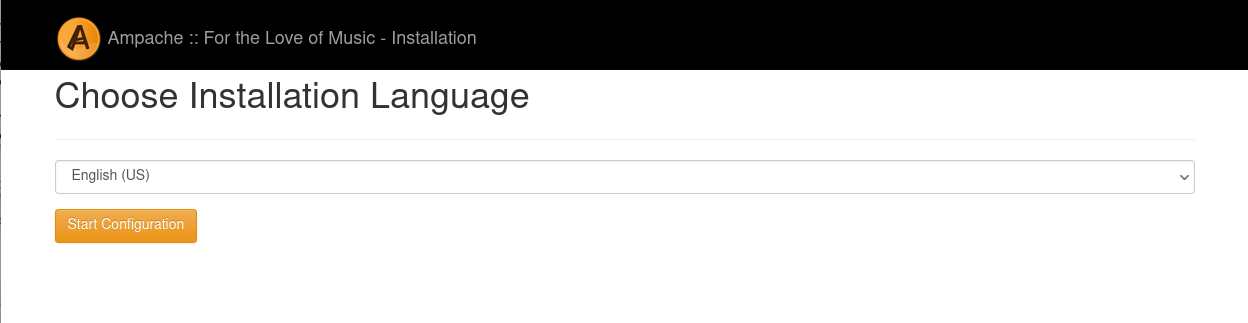
Assuming your web stack is set up properly and you chose the standard web path, this link should now take you to the first step of the online installer. If you set things up in a non-standard way, navigate to your chosen install root manually.
Select a language and press "Start Configuration".
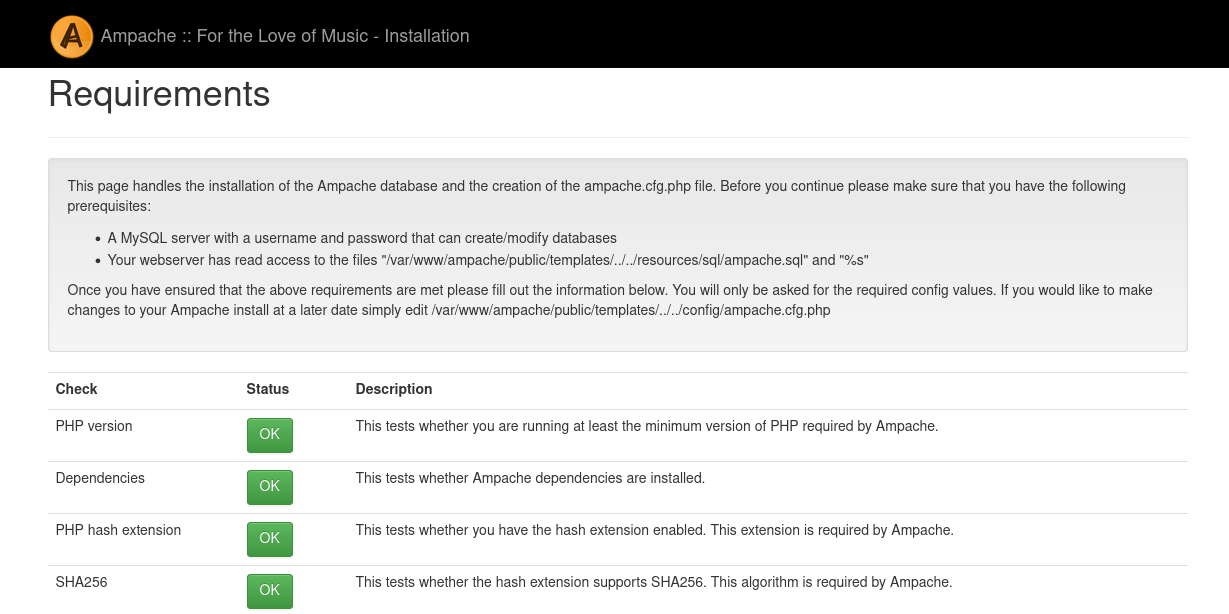
Check all errors and warnings about your environment.
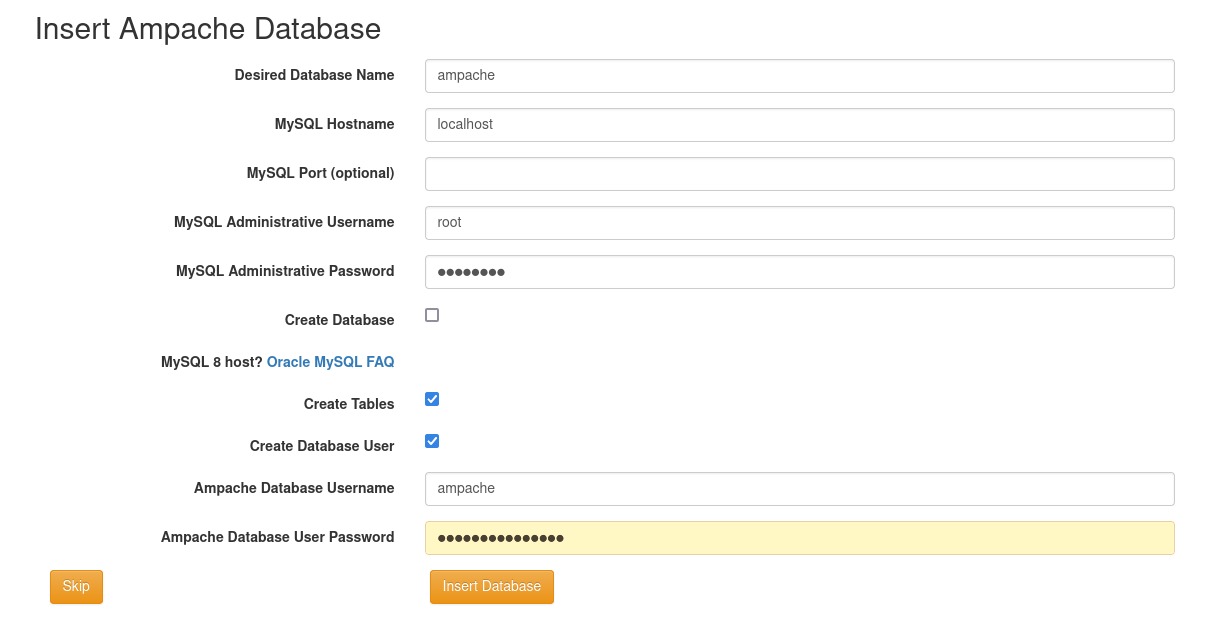
Fill out the form with the database information.
It's a good idea to not use your root user as the website database user. (blank database passwords are not accepted)
If PHP is able to write to the config directory, you will be able to write out the config file directly from this page.
If you want transcoding to be available make sure you pick something in the "Allow Transcoding" section
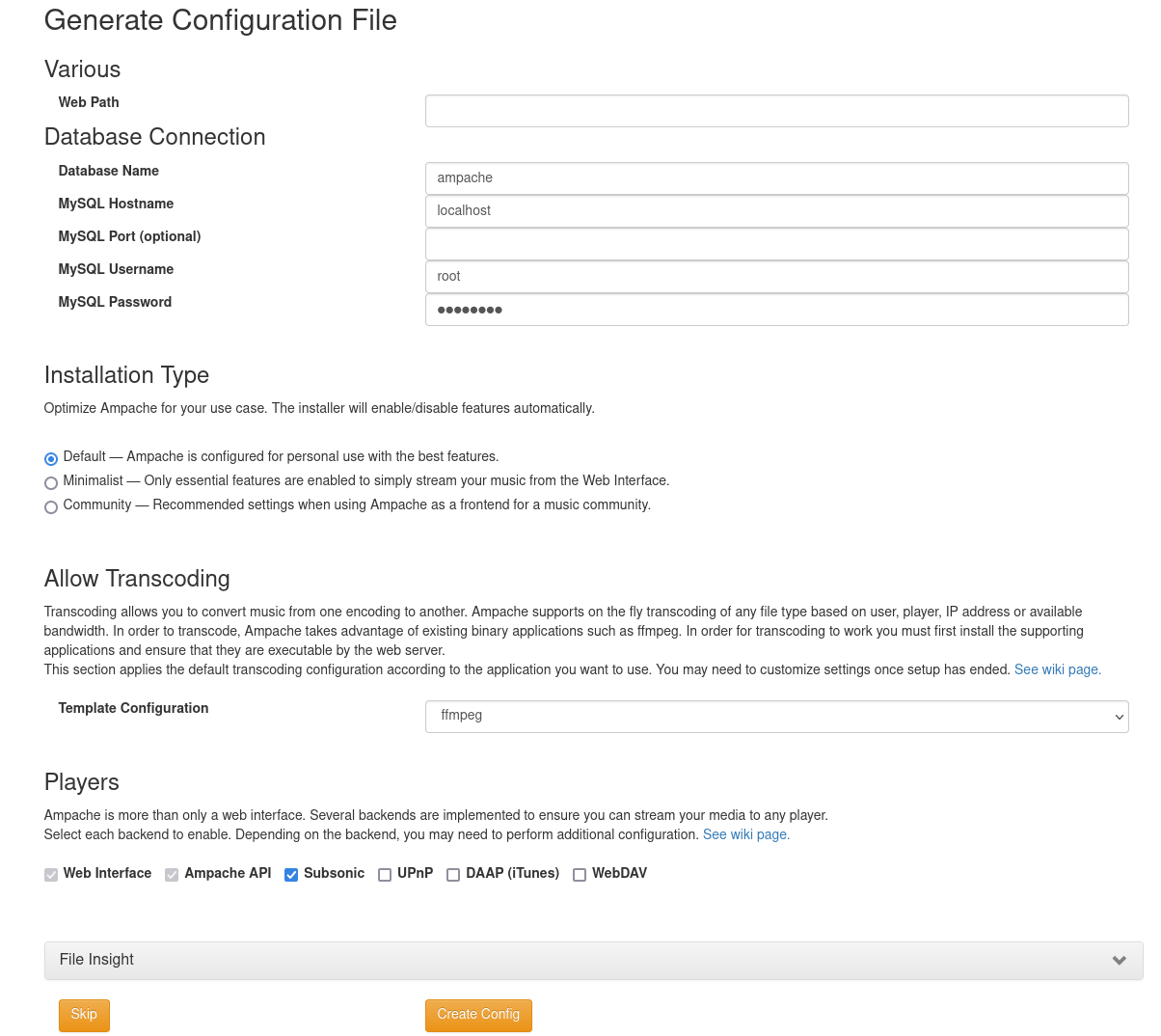
Installation Type
Default
Standard installation
Minimalist
Disables the following by default
- ratings
- sociable
- wanted
- live_stream
- download
- allow_video
Also defaults the sidebar to collapsed mode, as well as album/artist views as lists instead of grids
Community
Sets the following values
- use_auth = false
- licensing = true
- wanted = false
- live_stream = false
- allow_public_registration = true
- cookie_disclaimer = true
- share = true
- download = false
- home_now_playing = false
- home_recently_played = false
Create administrative user
The final step of installation is to create the initial administrative user.
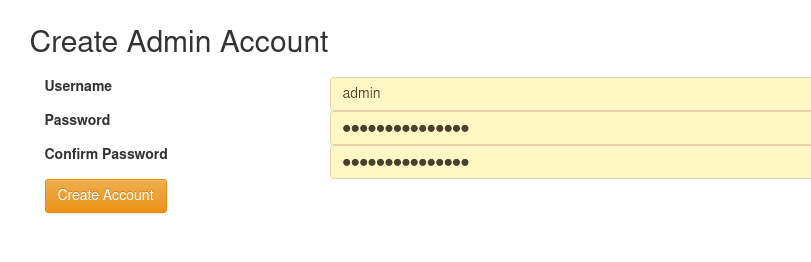
After you create your user you might have some database updates to install and then you'll be presented with the logon page
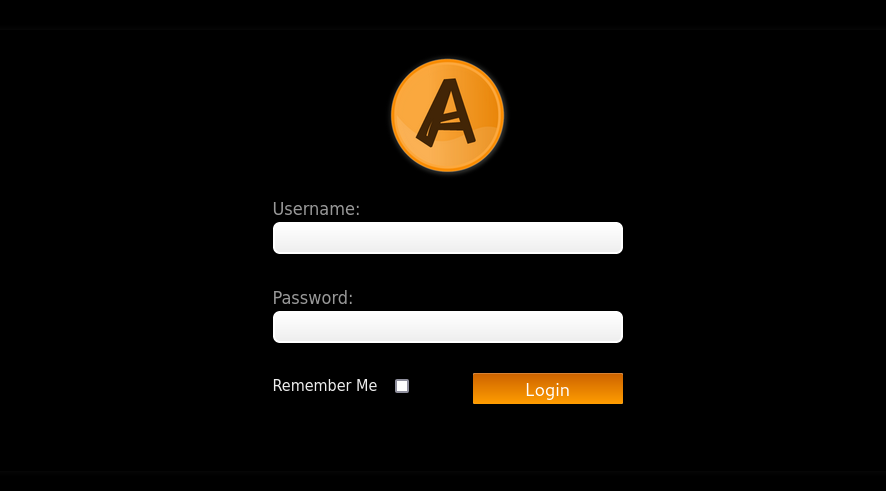
YOU DID IT!
Post Installation Tasks
You might want to look at Ampache config file in config/ampache.cfg.php. There are many options available that allow you to customize and change almost every feature available.
Make sure you check out Basic Configuration before you dive in!