Import Last.FM data
Import Last.FM info into Ampache
Before I started really using Ampache I scrobbled. I had years of information kept in Last.FM and that data is really important.
It keeps track of play counts and flagged (Loved) songs and can help you keep track of what you actually like.
Data is KING when your library grows so lets get your history into your new source of truth.
The Last.FM API does have a total play count for your user but we need to export the actual play history as Ampache will delete plays that do not exist in the object_count table.
Export your data
First up, you need to export your data to a local file.
Download this python export script lastexport3 to pull down the data from Last.FM.
python3 lastexport3.py -u UserName -o dump.txt
python3 lastexport3.py -u UserName -o loved.txt -t loved
note this should also work with Libre.FM as long as the export data is the same format using the --server parameter

Example of exported data
The exported data is tab separated (tsv) and will give you the date, title, artist, album and MBID data (if available)
scrobbles
1722981225    Watch Out    Marvel’s Spidey and His Amazing Friends - Cast    Disney Junior Music: Marvel's Spidey and His Amazing Friends - Glow Webs Glow
1722980076    Watch Out    Marvel’s Spidey and His Amazing Friends - Cast    Disney Junior Music: Marvel's Spidey and His Amazing Friends - Glow Webs Glow
1722979963    Pickle Family    Blaze and the Monster Machines    Rockin' Ride-Along Songs, Vol. 2
1722979866    Pickle Family    Blaze and the Monster Machines    Rockin' Ride-Along Songs, Vol. 2
1722979755    My Bath, My Bubbles and Me    SuperKitties - Cast    Disney Junior Music: SuperKitties Su-purr Edition
loved
1665559412    Dig    Mudvayne        03a58365-bdb0-3ffa-a5e3-c37dd9ad9d21    f1c8da15-b408-4149-b863-f1cbe9971f19
1665559411    I Am Nothing    Stabbing Westward        b7700d8d-36a8-436e-ab27-5035924209ac    6f29020d-49c1-4e26-869a-0603d14b7ca7
1652361377    Agony    Neuroticfish        889451c3-831a-46f8-a93f-ed478a367d6c    7d83bd42-d2c7-4b56-90d1-16717cfbcc98
Import to date into Ampache
The import script has been updated recently to support Python 3.12 and has been tested on Ampache 6+. update_ampache_from_file2.py
You can hardcode the variables inside the file or use a CSV config file in the same folder as the update script.
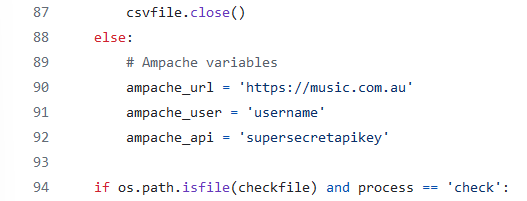
If you want to create a config file, call it ampache.csv and put in your details
# Ampache variables
ampache_url,https://music..com.au
ampache_user,username
ampache_api,supersecretapikey
When you have your dump and loved files, copy them and call them dump.txt and loved.txt.
There are CLI switches you can use or manually hardcode things as well in the file.
/d:filename.txt   Use a different dump file name (default dump.txt)
/l:filename.txt   Use a different loved file name (default loved.txt))
/c:filename.txt   Check a file has the full tab separated rows
/all              print all output rows
/silent           print nothing
/errors or /error print error messages only
Things to remember
You might have some poor data or data that doesn't match your current tags. This script will look for songs that match the data you give it.
I had to manually edit a lot of information as I had fixed up a lot of tags since 2005.
So if you print errors you can see which rows you need to look at, it may take a while but getting the data in Ampache is definitely worth the effort.
You can run this import as many times as you like, the existing play data will not be overwritten.
Clean up and duplication
There are 2 queries you'll want to run after this is done
When Ampache scrobbles a track it checks against the client agent that made the play. If the agent matches is will skip, if the agent doesn't match it will insert. This lets you play on the web while playing on your phone.
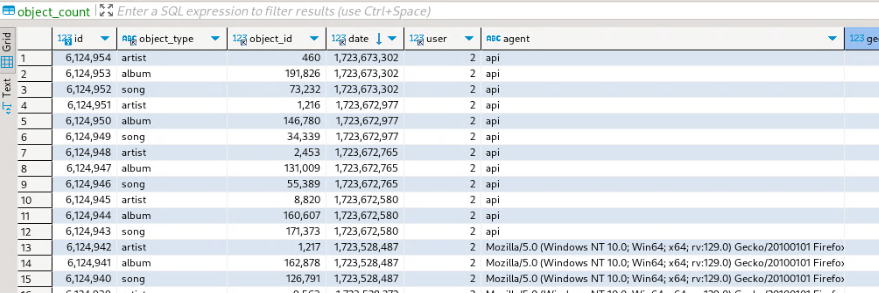
When you import it will only reject a scrobble if the agent matches so you'll get dupes. We can find out which ones are duplicates manually. So if you ran this script on top of existing data you will get duplicates (same object_id, object_type, date, user but under a different agent)
This query will give you an idea of duplicate plays in your database. (I had 3 in my database)
SELECT *
FROM `object_count`
WHERE `count_type` = 'stream' AND
      `date` IN (
                 SELECT `date`
                 FROM `object_count`
                 WHERE `count_type` = 'stream' AND
                       `object_type` IN ('song', 'podcast_episode')
                 GROUP BY `object_id`, `object_type`, `date`, `user`, `count_type`
                 HAVING COUNT(CONCAT(`object_id`, `object_type`, `date`, `user`, `count_type`)) > 1
      )
ORDER BY `date`, `object_type`;
This action is destructive and will the delete the highest id for these plays which will be the most recent inserted row. (we get the dates from songs and podcasts because you can have multiple artist entries for object_count)
DELETE FROM `object_count` WHERE `id` IN (
    SELECT `id` FROM (
        SELECT max(`id`) as `id`
        FROM `object_count`
        WHERE `count_type` = 'stream' AND
              `date` IN (
                         SELECT `date`
                         FROM `object_count`
                         WHERE `count_type` = 'stream' AND
                               `object_type` IN ('song', 'podcast')
                         GROUP BY `object_id`, `object_type`, `date`, `user`, `count_type`
                         HAVING COUNT(CONCAT(`object_id`, `object_type`, `date`, `user`, `count_type`)) > 1
        ) GROUP BY `object_id`, `object_type`, `date`, `user`, `count_type`
    ) AS `duplicate`
);
The key word here is destructive so before you do anything, make sure you back up the database.
I have deleted my stuff so many times over the years and almost lost everything a few times.