Plugin Options
Installing a plugin adds one or more preferences.
This page explains what each of those options means, its default value, and who can change it.
For what each plugin does and how to install it, see Ampache Plugins.
Where the options live
Once a plugin is installed its options appear under the Plugins section of a preferences page.
- Per-user options are set by each user under their own Preferences → Plugins. Every user chooses their own value.
- Server options (API keys and service URLs) are set once under Admin → Server → Preferences → Plugins and apply to the whole installation.
The Set by column below is the lowest access level allowed to change the option:
| Set by | Meaning |
|---|
| Each user | Every user sets their own value (user) |
| Content manager | Content managers and administrators (content_manager) |
| Manager | Managers and administrators (manager) |
| Admin | Administrators only (admin) |
Several plugins have no options and simply work once installed: Bluesky, Facebook, Mastodon, Twitter, Gravatar, Libravatar and ChartLyrics.
Homepage Plugins
All homepage options are set by each user.
Every homepage plugin shares a Plugin CSS order option (*_order, default 0).
The homepage lays its enabled sections out with the CSS order property, and this number is that value: lower numbers appear first.
0 is a special case that leaves the section in its default position, so while every section stays at 0 they keep their built-in order.
To rearrange them, give the sections distinct positive numbers — for example set Shout Home to 1 and Catalog Favorites to 2 to put the shoutbox above your favorites.
Catalog Favorites
| Preference | Default | Set by | Meaning |
|---|
catalogfav_max_items | 5 | Each user | How many favorite songs to show. |
catalogfav_gridview | Off | Each user | Show the favorites as an art grid instead of a list. |
catalogfav_compact | Off | Each user | Use compact media rows to fit more in less space. |
catalogfav_order | 0 | Each user | CSS order of this section (see above). |
Friends Timeline
| Preference | Default | Set by | Meaning |
|---|
ftl_max_items | 5 | Each user | How many timeline entries to show. |
ftl_order | 0 | Each user | CSS order of this section (see above). |
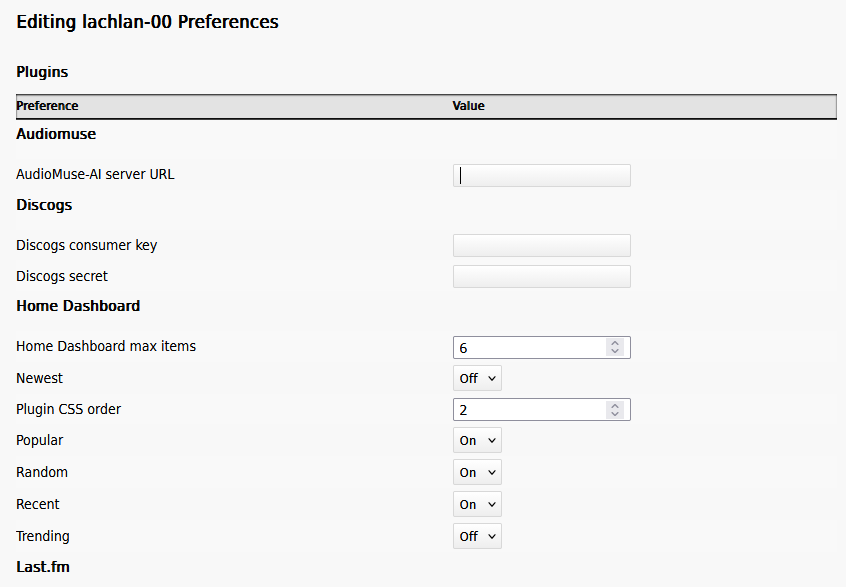
Home Dashboard
| Preference | Default | Set by | Meaning |
|---|
homedash_max_items | 6 | Each user | How many albums each enabled dashboard section shows. |
homedash_random | On | Each user | Show a Random section (random albums). |
homedash_newest | Off | Each user | Show a Newest section (albums most recently added to the library). |
homedash_recent | Off | Each user | Show a Recent section (albums played recently). |
homedash_trending | On | Each user | Show a Trending section (the most-played albums across all users). |
homedash_popular | Off | Each user | Show a Popular section (your own most-played albums). |
homedash_order | 0 | Each user | CSS order of this section (see above). |
Personal Favorites
| Preference | Default | Set by | Meaning |
|---|
personalfav_display | Off | Each user | Show your favorite lists on the homepage. |
personalfav_playlist | (empty) | Each user | Playlists to feature, as a comma-separated list of playlist ids (for example 3,7). The id is the number in the playlist's URL. |
personalfav_smartlist | (empty) | Each user | Smartlists to feature, as a comma-separated list of smartlist ids. |
personalfav_order | 0 | Each user | CSS order of this section (see above). |
| Preference | Default | Set by | Meaning |
|---|
rssview_feed_url | (empty) | Each user | The RSS feed to read items from. |
rssview_max_items | 5 | Each user | How many feed items to show. |
rssview_order | 0 | Each user | CSS order of this section (see above). |
Shout Home
| Preference | Default | Set by | Meaning |
|---|
shouthome_max_items | 5 | Each user | How many recent shouts to show. |
shouthome_order | 0 | Each user | CSS order of this section (see above). |
These look up art and tag information from an external service, so they need service credentials set once for the server.
Amazon
| Preference | Default | Set by | Meaning |
|---|
amazon_base_url | http://webservices.amazon.com | Manager | The Amazon web-service endpoint to query. |
amazon_max_results_pages | 1 | Manager | How many pages of results to fetch per search. |
amazon_developer_public_key | (empty) | Manager | Your Amazon Access Key ID. |
amazon_developer_private_api_key | (empty) | Manager | Your Amazon Secret Access Key. |
amazon_developer_associate_tag | (empty) | Manager | Your Amazon associate tag. |
Discogs
| Preference | Default | Set by | Meaning |
|---|
discogs_api_key | (empty) | Manager | Your Discogs consumer key. |
discogs_secret_api_key | (empty) | Manager | Your Discogs consumer secret. |
MusicBrainz
| Preference | Default | Set by | Meaning |
|---|
mb_overwrite_name | Off | Each user | Overwrite artist names that match a MusicBrainz id with the MusicBrainz spelling. |
TheAudioDb
| Preference | Default | Set by | Meaning |
|---|
tadb_api_key | (shared demo key) | Manager | Your TheAudioDb API key. Replace the bundled shared key with your own for reliable lookups. |
tadb_overwrite_name | Off | Each user | Overwrite artist names that match a MusicBrainz id with the TheAudioDb spelling. |
Lyric Plugins
LrcLib
| Preference | Default | Set by | Meaning |
|---|
lrclib_site_url | (empty) | Manager | The URL of an LrcLib-compatible lyrics server. |
Lyrist Lyrics
| Preference | Default | Set by | Meaning |
|---|
lyrist_api_url | (empty) | Each user | The URL of the Lyrist instance to query. |
Statistic Plugins
Analytics keys are set once by an administrator.
GoogleAnalytics
| Preference | Default | Set by | Meaning |
|---|
googleanalytics_tracking_id | (empty) | Admin | Your Google Analytics tracking id. |
Matomo
| Preference | Default | Set by | Meaning |
|---|
matomo_site_id | 1 | Admin | The Matomo site id to report to. |
matomo_url | your web path /matomo/ | Admin | The URL of your Matomo installation. |
Piwik
| Preference | Default | Set by | Meaning |
|---|
piwik_site_id | 1 | Admin | The Piwik site id to report to. |
piwik_url | your web path /piwik/ | Admin | The URL of your Piwik installation. |
Scrobble Plugins
Last.FM and Libre.FM connect through a grant link: open the Grant URL shown in your preferences to authorize Ampache, and the matching challenge/session value is then stored for you automatically.
Last.FM
| Preference | Default | Set by | Meaning |
|---|
lastfm_grant_link | (empty) | Each user | The authorization link used to connect your Last.FM account. |
Libre.FM
| Preference | Default | Set by | Meaning |
|---|
librefm_grant_link | (empty) | Each user | The authorization link used to connect your Libre.FM account. |
ListenBrainz
| Preference | Default | Set by | Meaning |
|---|
listenbrainz_token | (empty) | Each user | Your ListenBrainz user token. |
listenbrainz_api_url | api.listenbrainz.org | Each user | The ListenBrainz API host to submit to (change it to use a compatible server). |
Rating Plugins
RatingMatch
RatingMatch does two independent things, and you can use either or both.
1. Match a song's rating up to its album and artist.
When you rate a song at least Minimum star rating to match (ratingmatch_stars) stars, the plugin raises that song's album and each of its artists to the same rating.
It only ever raises a rating, never lowers one, so a higher existing album/artist rating is left alone.
Set the value to 0 to turn this off.
The matching When you love a track… option (ratingmatch_flags) does the same thing for flags: flagging (loving) a song also flags its album and artists.
2. Auto-rate and auto-flag songs from your own play and skip counts.
The five star rules and the flag rule watch how many times you have played or skipped a song and apply a rating (or a flag) automatically once a rule is met.
A song you have already rated yourself is never touched, so your own ratings always win.
How a rule is written.
Each rule is plays,skips — the play count first, then the skip count (a single number is treated as the play count alone).
Ampache counts your own plays and skips of the song and matches like this:
| Rule | Reads as | Matches once you have… |
|---|
10 | 10 plays, skips ignored | played it 10 or more times |
10,0 | 10 plays, skips ignored | played it 10 or more times |
0,10 | 10 skips, plays ignored | skipped it 10 or more times |
10,1 | 10 plays and 1 skip | both played it 10+ times and skipped it at least once |
1,10 | 1 play and 10 skips | both played it at least once and skipped it 10+ times |
A zero on either side means "ignore this side"; two non-zero numbers mean both thresholds must be reached.
When more than one star rule matches, the highest matching star wins.
A typical setup puts an easy threshold on a low star and a harder one on a high star — for example 5 on the 3-star rule and 25 on the 5-star rule — so a song creeps up to 5 stars the more you play it.
The flag rule uses the same plays,skips format to automatically "love" a song.
| Preference | Default | Set by | Meaning |
|---|
ratingmatch_stars | 0 | Each user | Rate a song at least this many stars to also raise its album and artist to match (0 disables it). |
ratingmatch_flags | Off | Each user | When you love a song, also flag its album and artists. |
ratingmatch_star1_rule … ratingmatch_star5_rule | (empty) | Each user | Auto-rating rules in plays,skips form; the highest matching star is applied. |
ratingmatch_flag_rule | (empty) | Each user | Auto-flag ("love") rule in plays,skips form. |
ratingmatch_write_tags | Off | Each user | Write ratings back to the file tags when they change. |
Shortener Plugins
Bit.ly
| Preference | Default | Set by | Meaning |
|---|
bitly_token | (empty) | Manager | Your Bit.ly access token. |
bitly_group_guid | (empty) | Manager | The Bit.ly group GUID to create links under. |
YOURLS
| Preference | Default | Set by | Meaning |
|---|
yourls_domain | (empty) | Manager | The domain name of your YOURLS installation. |
yourls_use_idn | Off | Manager | Encode internationalised domain names (IDN) in the shortened links. |
yourls_api_key | (empty) | Manager | Your YOURLS API signature token. |
Slideshow Plugins
Flickr
| Preference | Default | Set by | Meaning |
|---|
flickr_api_key | (empty) | Manager | Your Flickr API key, used to fetch artist photos. |
Stream Control Plugins
Enforce a per-user streaming limit measured over a rolling history window: Ampache adds up the last N days of activity and blocks new streams once the maximum is passed.
A maximum below 0 (for example -1) means unlimited.
Stream Bandwidth
| Preference | Default | Set by | Meaning |
|---|
stream_control_bandwidth_max | 1024 | Content manager | Maximum bandwidth in MB allowed over the history window (the default 1024 is 1 GB). |
stream_control_bandwidth_days | 30 | Content manager | The history window, in days, the limit is measured over. |
Stream Hits
| Preference | Default | Set by | Meaning |
|---|
stream_control_hits_max | -1 | Content manager | Maximum number of streams allowed over the history window. |
stream_control_hits_days | 30 | Content manager | The history window, in days, the limit is measured over. |
Stream Time
| Preference | Default | Set by | Meaning |
|---|
stream_control_time_max | -1 | Content manager | Maximum listening time in minutes allowed over the history window. |
stream_control_time_days | 30 | Content manager | The history window, in days, the limit is measured over. |
Wanted Plugins
Headphones
| Preference | Default | Set by | Meaning |
|---|
headphones_api_url | (empty) | Each user | The URL of your Headphones installation. |
headphones_api_key | (empty) | Each user | Your Headphones API key. |
Geolocation Plugins
GoogleMaps
| Preference | Default | Set by | Meaning |
|---|
gmaps_api_key | (empty) | Manager | Your Google Maps API key, used to show user locations. |
Song Preview Plugins
iTunes and Deezer
Neither preview plugin has any preferences; both use a public search api that needs no key or account.
User Plugins
Paypal
| Preference | Default | Set by | Meaning |
|---|
paypal_business | (empty) | Each user | Your PayPal ID (the account donations are sent to). |
paypal_currency_code | USD | Each user | The currency code used for the donation button. |