Ampache CLI Commands
Ampache CLI Commands
Every administrative and maintenance task in Ampache is available from the command line through bin/cli.
This page lists every command grouped by its prefix.
For the migration history from the old bin/*.inc scripts see Ampache CLI.
Run the program with no arguments to see the full list, and add -h or --help to any command to see its arguments and options.
php bin/cli
php bin/cli admin:addUser --help
Commands are grouped by a prefix that describes what they touch:
admin:— users, modules, mail, database and other server administrationrun:— catalogs and long-running background processescleanup:— housekeeping of statistics, art and disabled mediaexport:— writing art, playlists and catalog metadata to diskprint:— read-only reports printed to the terminalshow:— read-only information about the installation
Two more commands live in a separate binary, bin/installer, because they have to run before there is a config file to read. They are listed at the end of this page.
Most admin: and run: commands change your database, so treat them with the same care as the equivalent page in the web interface.
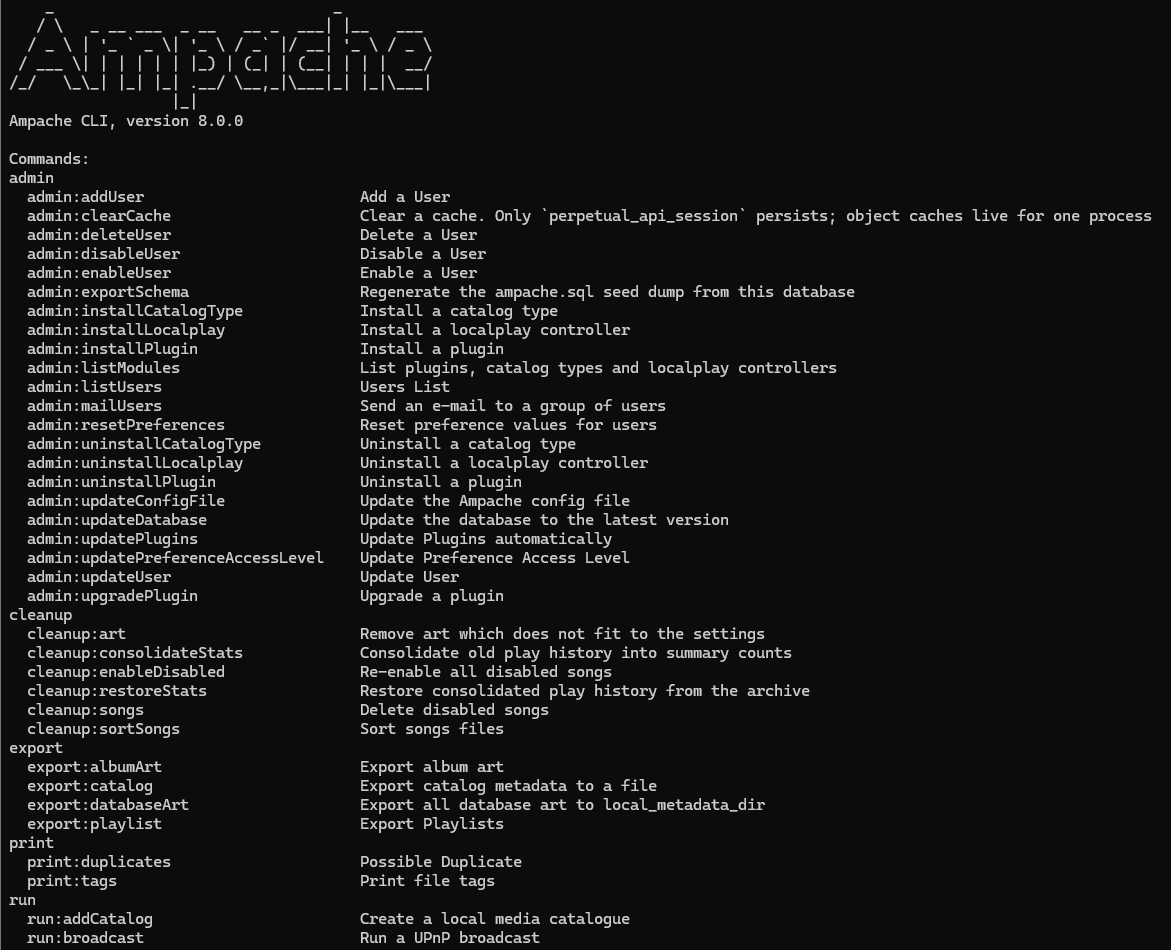
admin: server administration
Many of these commands mirror an action on an Admin page in the web interface and call the same code underneath, so a change made on the command line shows up in the browser and vice versa.
Users
| Command | What it does |
|---|---|
admin:addUser | Create a user account. Takes a <username> argument plus --password, --email, --website, --name and --level options. A random password is generated when none is supplied. |
admin:listUsers | List every user, or find one by [username] / --user <id>. --apikey prints only the API key. |
admin:updateUser | Update a single user: generate a new --apikey, --streamtoken or --rsstoken, set the --subsonic password, or change the access --level. New in Ampache 8: --subsonic. |
admin:deleteUser | Delete a user by [username] or --user <id>. Refuses to remove the last active administrator. |
admin:enableUser | Enable a disabled user. |
admin:disableUser | Disable a user. Refuses to disable the last active administrator. |
# Create a manager-level user with a known password
php bin/cli admin:addUser jane --level 75 --password "s3cr3t" --email [email protected]

# Rotate a user's API key
php bin/cli admin:updateUser jane --apikey

# Disable, then later delete a user
php bin/cli admin:disableUser jane
php bin/cli admin:deleteUser jane
NOTE Access Control Lists, Licenses and Catalog Filters have no CLI commands. They are managed from Admin → Access Control, Admin → Licenses and Admin → Catalog Filters in the web interface, or through the API.
Modules (plugins, catalog types and localplay)
Ampache has three kinds of pluggable module: application plugins, catalog types (the backends a catalog can use, such as subsonic or beets) and localplay controllers (players such as mpd that Ampache can drive).
These mirror the Admin → Modules pages.
| Command | What it does |
|---|---|
admin:listModules | List every plugin, catalog type and localplay controller and whether it is installed. |
admin:installPlugin | Install (enable) a plugin by <name> and rebuild user preferences so its settings appear. |
admin:uninstallPlugin | Uninstall (disable) a plugin by <name>. |
admin:upgradePlugin | Upgrade an installed plugin by <name> to the bundled version. |
admin:installCatalogType | Install (enable) a catalog type by <type>. |
admin:uninstallCatalogType | Uninstall (disable) a catalog type by <type>. |
admin:installLocalplay | Install (enable) a localplay controller by <type> and set the localplay preferences for --user. |
admin:uninstallLocalplay | Uninstall (disable) a localplay controller by <type>. |
php bin/cli admin:listModules
php bin/cli admin:installPlugin lastfm
php bin/cli admin:installCatalogType subsonic
php bin/cli admin:installLocalplay mpd
See Ampache Plugins for what each plugin does.
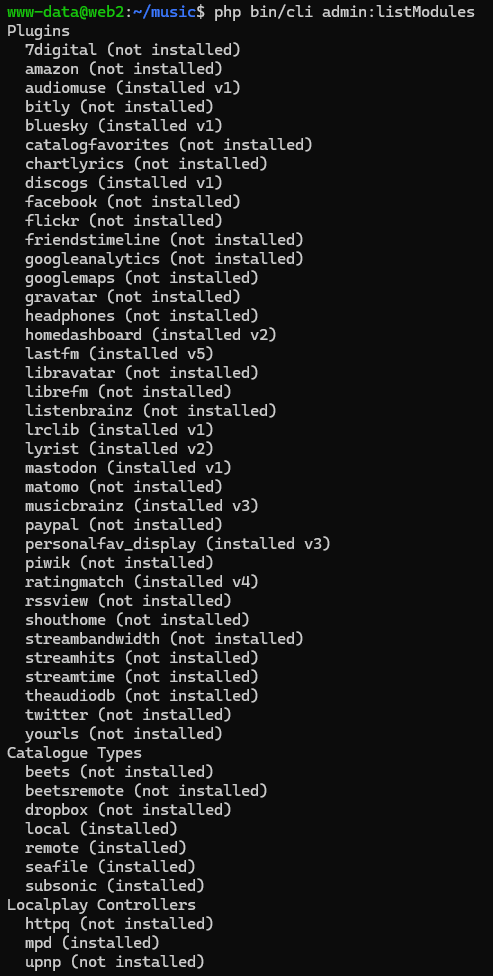
Mail
| Command | What it does |
|---|---|
admin:mailUsers | Send an e-mail to a group of users. Takes a [group] argument (all, users, admins, inactive) plus --subject and --message. Does nothing when mail is disabled or the server is in demo mode. |
php bin/cli admin:mailUsers users --subject "Maintenance" --message "The server restarts at 02:00 UTC."
System administration
| Command | What it does |
|---|---|
admin:updateDatabase | Apply any pending database migrations. Run this after upgrading Ampache. Prints what it would do; -e actually applies it. |
admin:updateConfigFile | Regenerate config/ampache.cfg.php, merging in any new options for your installed version. Ampache 8 ships config_version 95. |
admin:updatePlugins | Upgrade every installed plugin to its bundled version in one pass. |
admin:updatePreferenceAccessLevel | Change the access level required to edit a preference. Takes --level and needs -e to write. |
admin:resetPreferences | Reset preference values back to their defaults for a <username>. Takes --preset and needs -e to write. |
admin:clearCache | Clear a cache by [type]. Only perpetual_api_session has a lasting effect (it removes stored perpetual API sessions); the song, artist and album object caches live only for a single process. |
admin:exportSchema | Regenerate the resources/sql/ampache.sql seed dump from the current database. A development/release tool; it refuses to run when migrations are pending. |
run: catalogs and background processes
Catalogs
| Command | What it does |
|---|---|
run:addCatalog | Create a local media catalog. Takes [catalogName], [catalogPath], [mediaType] (music, video, podcast), [filePattern] and [folderPattern]. |
run:updateCatalog | Perform catalog actions across all files: clean, add, gather art, verify and garbage-collect. With no options the defaults -ceagt are used. Accepts a [catalogName] and [catalogType]. |
run:updateCatalogFile | Perform catalog actions for a single file. Takes <catalogName> <filePath>. |
run:updateCatalogFolder | Perform catalog actions for a single folder. Takes <catalogName> <folderPath>. |
run:deleteCatalog | Delete a catalog by <catalogId> and everything it owns. |
run:enableCatalog | Enable a catalog by <catalogId>. |
run:disableCatalog | Disable a catalog by <catalogId> without deleting it. |
run:moveCatalogPath | Update the stored file locations for a catalog after a mount point has changed. |
New in Ampache 8: -s|--scan builds the Folders tree for a catalog, the same job as the Scan Folders action on the catalog page. It is available on run:updateCatalog and run:updateCatalogFolder and is not one of the -ceagt defaults, so it has to be asked for.
php bin/cli run:addCatalog music /media/music music
php bin/cli run:updateCatalog music
php bin/cli run:updateCatalog music -s
php bin/cli run:disableCatalog 3
The -v verify switch from Ampache 4 is now -e.
Background processes
| Command | What it does |
|---|---|
run:cronProcess | Run the scheduled cron tasks. Intended to be triggered from the system cron. See CRON. |
run:cacheProcess | Populate the transcode cache. |
run:computeCache | Rebuild the object cache tables. |
run:calculateArtSize | Fill in the stored width/height for art. |
run:convertFilenames | Convert file names in the database to a different character set. --charset picks the target. |
run:broadcast | Run a UPnP broadcast. |
run:websocket | Run the WebSocket server used by the now-playing broadcast feature. --port defaults to 8100. |
run:updateDb | Check, and only fix, database/table/column charset, collation and engine mismatches against resources/sql/ampache.sql (engine against your config). Dry run until -x|--execute. |
cleanup: housekeeping
| Command | What it does |
|---|---|
cleanup:enableDisabled | Re-enable every song that was previously disabled. |
cleanup:songs | List songs that are currently disabled; -d|--delete removes them. |
cleanup:art | Remove art that no longer fits the configured settings. -c drops missing files from the database, -t deletes all thumbnails. |
cleanup:sortSongs | Move song files into place according to the catalog sort pattern. |
cleanup:consolidateStats | Consolidate old play history into summary counts and archive the detail rows. New in Ampache 8. |
cleanup:restoreStats | Restore consolidated play history back from the archive. New in Ampache 8. |
Everything under cleanup: is a dry run until you ask for the write. The flag is not the same on every command: cleanup:art and cleanup:sortSongs take -x|--execute, cleanup:consolidateStats and cleanup:restoreStats take -e|--execute, and cleanup:songs takes -d|--delete.
# See what would be consolidated, then actually do it
php bin/cli cleanup:consolidateStats
php bin/cli cleanup:consolidateStats -e
See Play history consolidation for what the two stats commands move around.
NOTE There is no CLI command for clearing play statistics or the now-playing list. Use Clear Stats on the Admin → Manage Catalogs page and Clear Now Playing in the admin sidebar.
export: writing files to disk
| Command | What it does |
|---|---|
export:catalog | Export catalog metadata to a file. Takes a <file> argument and a [format] (csv or itunes); --catalog limits it to one catalog. |
export:playlist | Export lists to a <directory>. [type] picks albums, artists, playlists or smartlists and [extension] picks m3u, xspf or pls. --web writes stream urls instead of file paths. |
export:albumArt | Export album art to the catalog folders. [type] is linux or windows and sets how the metadata is written. |
export:databaseArt | Export all art stored in the database to the local_metadata_dir. --clear drops the database copy once the file exists. |
php bin/cli export:catalog /backup/library.csv csv
print: terminal reports
| Command | What it does |
|---|---|
print:duplicates | Print possible duplicate albums, artists or songs. -t|--type selects what to look for (default album). |
print:tags | Print the tags Ampache reads from a media <filename>. |
show: installation information
| Command | What it does |
|---|---|
show:debug | Print a headless status and environment report: version, structure, PHP version, last cron run and a pass/fail list of the runtime prerequisites. Add --check-updates to also query the remote latest version. |
show:version | Print the Ampache version. |
php bin/cli show:debug
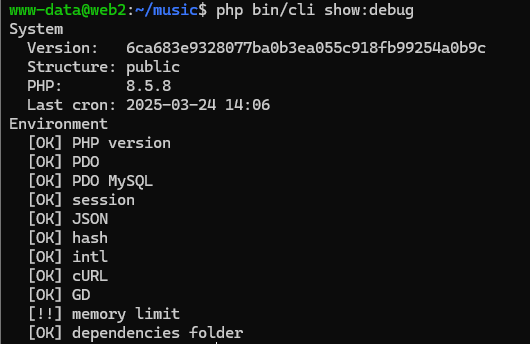
bin/installer — before Ampache has a config
bin/installer is a second, smaller binary. Its two commands run before there is a config file or a database, which is why they are not in bin/cli and why bin/cli htaccess does not exist.
| Command | What it does |
|---|---|
install | Create and populate the database and write config/ampache.cfg.php. See Installation. |
htaccess | Write the .htaccess files Apache reads. Nothing happens without -e, which is a dry run guard, not a default. |
htaccess -e writes the two files Ampache needs, public/play/.htaccess and public/rest/.htaccess.
Without them, streaming returns 404 and every Subsonic or REST client fails.
| Option | What it adds |
|---|---|
-e|--execute | Actually write the files. Without it the command only prints its help. |
-p|--public | Also write public/.htaccess, which is optional hardening rather than something Ampache needs. |
# the two files Ampache needs
php bin/installer htaccess -e

# and the optional web root file as well
php bin/installer htaccess -e -p
The web root file carries a user art redirect, blocking for private paths such as config/ and .git, and a commented-out bot filter. Ampache behaves identically without it.
NOTE -p overwrites public/.htaccess. If you uncommented the bot filtering or edited it in any other way, back it up first.
Rewrite Rules covers what each file does, what the web root file blocks, and how to check the rules are being read.
php bin/installer install -U root -P mypassword -H localhost -d ampache -u ampache -p ampachepassword -w /ampache -f
NOTE install takes -p|--ampachedbpassword, which is a different option to htaccess's -p|--public. The two commands do not share options.