Private Catalogs
Ampache Private Catalogs
Want to organize catalogs so your kids can't hear your music or your wife can safely avoid Malaysian Gore-Grind?
Previously Ampache5 allowed private catalogs which were tied to a single user OR public to everyone.
In Ampache 5.5.0+ you can assign catalogs into filter groups and then assign users to these new groups.
Enable catalog_filter in your config
Edit your config and enable catalog_filter

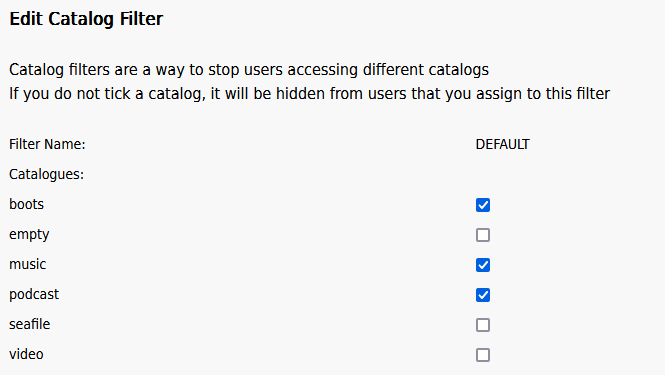
Edit your default filter
Go to admin/filter.php on your server to view a list of filters.

The 'DEFAULT' group is assigned to new users. When you untick a catalog it is hidden from users in this group.
Assign new groups to users
When you make your own filter you can assign them to your users from the admin page admin/users.php
Simply assign the group to the user and save

I used to have private catalogs what do I do
If you previously had private catalogs these will be migrated to new groups.
Lets say you have a server with 4 users; 'administrator', 'wifeuser', 'kiduser' and 'generic'
In this example you have 4 catalogs:
- shared music - 'Public Catalog'
- wife music - 'wifeuser'
- kid music - 'kiduser'
- my music - 'administrator'
What happens after you upgrade your server? You will end up with 4 groups:
DEFAULT will have one catalog shared music because this was the only public catalog you had.
The generic user will be the only member of DEFAULT because they did not have a private catalog.
All other users will have their own group created as the username for that account
- wifeuser
- wife music
- shared music
- kiduser
- kid music
- shared music
- administrator
- my music
- shared music
This should allow you to continue as though nothing has changed!